Showing posts with label warehouse. Show all posts
Showing posts with label warehouse. Show all posts
Monday, March 13, 2017
Tekoa ERP Mobile Warehouse Management
Tekoa ERP Mobile Warehouse Management
Increase Accuracy and Inventory Controls with Mobile Inventory Management
By: Tekoa SoftwareProduct inventory represents one of the largest investments for a Distribution or Manufacturing business. Tekoa ERP Mobile Warehouse Management helps you increase the accuracy and efficiency of inventory quantities so you can increase the control of inventory procedures and better manage inventory values.
Here are some of the advanced features of Tekoa ERP Mobile Warehouse.
| |||||
|


Mobile ReceivingDesigned for quick and easy input, Tekoa Mobile Receiving allows mobile users to scan in items received and enter the appropriate quantity. Tekoa automatically validates the scan to let the user know if the code scanned is recognized after comparing the entry against product identity aliases.Mobile users can view and edit in process receipts and a running total of total quantity received is clearly visible for easy visual validation. |  |
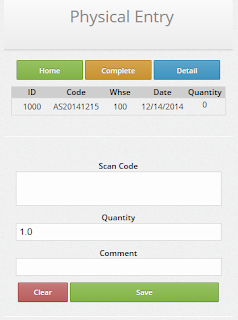 | Mobile Physical CountInventory Physical Count Entry is also optimized for rapid data entry when the mobile user scans a product bar code and enters a physical count quantity. Scanned product codes are then validated against known item aliases and visual confirmation is provided to the user.Physical Count entries are collected in groups by warehouse where count entries can be maintained by managers and posted once the entire physical count is completed. |
Mobile Manufacture Operation EntryTekoa Mobile makes it fast and simple to track production costs by allowing mobile users to scan production step operation codes from a Production Ticket or Traveler document.Using the Production Route established for the Finished Good, Tekoa Mobile automatically processes one, or multiple cascading production steps recording production costs - with just ONE scan required by the production mobile user. Intended for fast and easy data entry, processing production costs cant get any easier. |  |
 | Mobile Point of SaleOne of the most powerful features of Tekoa Mobile is the Point of Sale Entry function.Using Tekoa Mobile POS, users have the ability to:
|
Tekoa ERP is mobile optimized, which means it is built with mobile technology in mind and works on mobile devices, phones, tablets as well as computers. That said, the above listed functions are specifically designed for use in Inventory Warehouse Management and incorporate the use of bar code scanning and rapid data entry.
For more information about Tekoa Mobile Warehouse Management, visit us online at www.TekoaERP.com.
Available link for download

Mobile ERP Warehouse Managment
Mobile ERP Warehouse Managment
Explore the essential benefits of Mobile devices fore warehouse ERP Inventory
 |
| www.TekoaERP.com |
Mobile ERP
Businesses are turning to mobile devices to improve business processes within the warehouse. Mobile devices such as Surface RT, Handheld Barcode Scanners, ToughPads, and Android devices offer seemingly limitless potential for organizations to improve efficiency and performance. Just as new ERP applications are released daily to make our lives easier, so too are applications emerging which can benefit both small and large corporations.Mobile Device Benefits for Warehouse Management
Sales Order Picking
Mobile devices offer several other possible benefits to warehouses considering them to improve business processes. Packaging operations benefit from mobile computer technology by enabling automatic and precise order validation. It is no longer necessary for packers to guess the correct carton to use because the system can identify the proper carton size and send that information to a mobile device. The carton can then be scanned, verifying that the right one was chosen. Additionally, the mobile ERP devices can keep a real-time inventory of packaging materials, so that the organization can know whether more packaging materials will be needed at any time.Sales Order Shipping
In terms of the shipping process, businesses can equip their workers with a mobile device and printer so that they can quickly scan a shipment to ensure that the right items are sent. The system will also verify the shipping address and provide information to load the shipment on the proper truck. Printing all shipping documents automatically also enhances the process and guarantees that the order will be correct.Purchase Order Receiving
Furthermore, mobile ERP devices can help guide workers throughout the warehouse. For example, after scanning an incoming good which needs to be stored in inventory, the mobile device has the capability of showing the worker the fastest route to the location where the good needs to be stored. This process increases efficiency, as workers would be able to store more goods in a shorter amount of time.In summary, mobile ERP devices offer businesses many potential benefits within the warehouse, including improvements of the shipping, stocking, and packaging processes, as well as the easy sharing/accessing of information. As time goes on, it is likely that warehouses will continue to turn to mobile devices to improve business processes.
For more information about Mobile Warehouse Management for ERP, visit www.TekoaSoftware.com.
Available link for download
Subscribe to:
Posts (Atom)