Showing posts with label erp. Show all posts
Showing posts with label erp. Show all posts
Monday, March 20, 2017
Terminal Services and Sage ERP 100 MAS Explained
Terminal Services and Sage ERP 100 MAS Explained
Essential Insights Into Remote Desktop Terminal Services and Sage ERP 100 MAS90 MAS200.
By: Tekoa Software
Cloud Enable Your Enterprise
Sage ERP 100 MAS 90 and MAS 200 from Sage Software are two of the most widely used mid size business management and accounting applications in service today. Both MAS 90 (standard) and MAS 200 (advanced) share the same end-user capability and functionality. The primary difference between MAS 90 and MAS 200 is the back-end technology. MAS 200 is a client-server application which works more efficiently than MAS 90 on wide area networks and large user counts.
One method gaining popularity among business that own Sage ERP 100 MAS 90 and MAS 200 is the use of Terminal Services to host MAS. There are a number of benefits to using Remote Desktop Services for Sage ERP 100 MAS 90/200. Here is a list of some of the benefits:
1. Improved Security
Something your MAS consultant may not tell you is that Sage MAS 90 and MAS 200 require Full Access network security rights to not only the installation directory on the server, but often times the Program Files directory as well. Hosting MAS 200 on a Remote Desktop Terminal Server improves security because network administrators can limit the terminal session to only execute MAS, and then close the session when MAS is closed - therefore it is not a problem that the user has full control rights because the only software they can run in the terminal session is MAS itself. Using the MAS 200 client directly on the network without Terminal Services exposes your network to either malicious or silly employee errors.2. Remote Office Capability
Using Remote Desktop Terminal Services for Sage ERP 100 MAS 200 also makes connecting remote offices and at-home users much more efficient and capable. IT pros familiar with MAS know that even the "thin-client" install of MAS 200 is not very efficient over a wide area network. Even with Sages addition of a client server ODBC driver, the performance of the direct MAS 200 Client over a wide area network is not ideal and has frustrated many an end-user. Using Remote Desktop Terminal Server to host MAS 200 is the "no brainer" solution for connecting home offices and remote offices to a centralized MAS 200 installation.
3. Easier Upgrades
Instead of having to visit each workstation and upgrade the client application, the Remote Desktop implementation of Sage ERP 100 MAS makes upgrades easier because you only need to update 1 client installation - the one on the host server, then all users get the upgraded functionality and benefits at the same time, with only 1 client upgrade required.4. Flexibility
Expand and contract the amount of technical resources needed as your organization evolves and changes. No need to overbuild and overpay now so you can grow into the future. Get the amount of tech you need today and easily expand that capability down the road when more is needed.
5. Cost Benefits
Take the total number of dollars the business spent on Sage ERP 100 MAS support services and hardware infrastructure over the last year. Divide that number by twelve and come up with an estimated monthly cost for running an on premises Sage ERP 100 MAS system. Compare that number to the cost of a hosted Remote Desktop Terminal Server hosted solution and chances are very good that the benefits and costs will be attractive. Take the time to run some quick numbers and see if it is a good idea for your company.
Allan Snodgrass
Tekoa Software, Inc.
Allan is a Technology Solution Professional at Tekoa Software in Washington state. For more information about a Remote Desktop Terminal Server solution for your business, visit www.TekoaSoftware.com or call 888-811-2998. Connect the dots with Tekoa Software.
Available link for download

Sunday, March 19, 2017
ERP Business Process Problems and Solutions
ERP Business Process Problems and Solutions
Common Business Process Problems and Solutions
By: Taylor Farnsworth
 |
| www.TekoaERP.com |
There are several problems relating to business processes in todays enterprise. According to cmswire.com although many of these problems may be quite simple to take care of and eliminate, there seems to be five problems that continue to persist.
These five problems are: Bottlenecks, Paper Trails, Copies, Preparation, and Business Agility.
Problem 1: Bottlenecks
These information bottlenecks occur from "a lack of consideration of the value of particular information, or content, and its relevancy in the business process."Possible Solution:
Research done by cmswire.com has found that enterprises must examine who needs this info, what info is essential, and whether or not it is needed in the current business process. Research also finds that enterprises must index or organize all of this information, and find a way to store the other information not being used.
Problem 2: Paper Trails
Today, enterprises are still using paper documents in their business process, which leaves valuable information vulnerable to loss, errors, and data theft.Possible Solution: The research done by cmswire.com "recommends a planned conversion of paper documents and records into digital information that can be entered, or taken out of business process, as needed, and which can be more easily found in the event of audits or other legal processes." This is an excellent solution to this problem because in today’s world, with technology being so advanced and becoming easier to understand and use, simply switching your business to a digital format rather than paper makes things much easier to keep in order and to keep back-ups of.
Problem 3: Copies
So many enterprises today are keeping several copies of certain documents, whether to be safe or because they believe these documents to be vital to their business processes. With this, response time is slowed and business process agility decreases.Possible Solution: Businesses that are keeping all of these extra copies, whether digital or paper, just need to stop. "They need to create business processes based on single documents, or to create minimal copies that are tracked and regulated within the processes. To do this, cmswire.com states, and I agree that a centralized, electronic storage that provides company-wide accessibility must be utilized.
Problem 4: Preparation
Research shows that many companies are only prepared for what they believe they will have to deal with. In turn, when something unexpected happens, companies are not prepared to respond without considerable business disruption.
Problem 5: Business Agility
Several businesses suffer from not being able to get the right information to the right people in a reasonable amount of time. This is mostly seen by those businesses that struggle with effective and efficient storage methods.Possible Solution: To be a business with effective and efficient storage, according to cmswire.com, "enterprises should optimize workflows so they are able to flex with the changing needs of their company."
In Summary:
As you can see from the problems listed above, having an effective and efficient business and business process is not terribly difficult to accomplish. Many businesses just need to buckle down and take care of these little problems that keep occurring and slowing them down. If they are to take care of these simple-to-fix problems, they will be a much more effective, efficient, and in turn a more profitable organization.Taylor Farnsworth is an accounting and business specialist at Whitworth University
Available link for download
Saturday, March 18, 2017
Sage ERP 100 MAS Production
Sage ERP 100 MAS Production
Sage ERP 100 MAS90 MAS200 Easy Manufacturing and Make to Order
By: Allan Snodgrass
 |
| www.TekoaERP.com |
Here are some insights into how Sage ERP 100 MAS users can use Purchase Orders to track Bill of Materials Production.
Bill of Materials Production Entry in Sage 100 allows users to turn raw materials into finished goods with a simple and straight forward process. Enter in a finished good bill, post the transaction and the component items are removed from inventory and the finished good receipted into inventory. Simple and easy.
The problem lies in that it can then be difficult to track and schedule production of the finished goods inside MAS itself. Often times spreadsheets or manual lists are used to calculate the production needed and then to track how many finished goods are required to meet the production schedule.
Of course the Sage 100 Work Order Module is a full featured way of tracking production in detail. But what if you just want to submit a "production order" and then when production is completed, update that production order to reflect the quantity produced.
Well, Tekoa Software has come up with an integration tool to help manufacturers track production orders using the Purchase Order module in Sage 100.
Using this new integration tool, Tekoa Software enables users to identify Production Purchase Orders that will be modified automatically when a Bill of Materials production entry is completed. Simply enter in a MAS Purchase Order and identify it as a Production Order. Then when Production is posted, the Production Purchase Order will be automatically updated to reflect the quantity that has been manufactured. To prevent double receipts, the Tekoa Integrator does not post receipts to the PO, rather maintains a simple amount if production that can then be used to help with the essential scheduling of production. Tekoa Integrator will also email key users alerting them that a production order has been updated, adding the ability to monitor your Production POs and schedule.
Gain this simple and easy to use functionality - without any custom programming. No customization to MAS itself that would prevent upgrades or other enhancements. Tekoas solutions employ the latest in application technology and do not require MAS to be modified to perform the task.
So if your enterprise needs a simple way of entering Production Orders using Purchase Orders, this new tool from Tekoa Software can help streamline your business processes. For more information about Tekoa Integrator or Bill of Materials Production Purchase Orders for Sage 100, give Tekoa Software a call.
By: Allan Snodgrass
Technology Solutions Professional
Tekoa Software, Inc.
www.TekoaSoftware.com
Available link for download
Monday, March 13, 2017
Tekoa ERP Mobile Warehouse Management
Tekoa ERP Mobile Warehouse Management
Increase Accuracy and Inventory Controls with Mobile Inventory Management
By: Tekoa SoftwareProduct inventory represents one of the largest investments for a Distribution or Manufacturing business. Tekoa ERP Mobile Warehouse Management helps you increase the accuracy and efficiency of inventory quantities so you can increase the control of inventory procedures and better manage inventory values.
Here are some of the advanced features of Tekoa ERP Mobile Warehouse.
| |||||
|


Mobile ReceivingDesigned for quick and easy input, Tekoa Mobile Receiving allows mobile users to scan in items received and enter the appropriate quantity. Tekoa automatically validates the scan to let the user know if the code scanned is recognized after comparing the entry against product identity aliases.Mobile users can view and edit in process receipts and a running total of total quantity received is clearly visible for easy visual validation. |  |
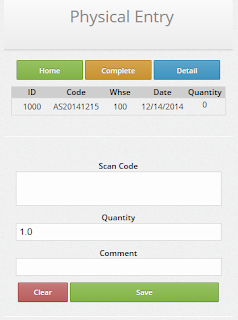 | Mobile Physical CountInventory Physical Count Entry is also optimized for rapid data entry when the mobile user scans a product bar code and enters a physical count quantity. Scanned product codes are then validated against known item aliases and visual confirmation is provided to the user.Physical Count entries are collected in groups by warehouse where count entries can be maintained by managers and posted once the entire physical count is completed. |
Mobile Manufacture Operation EntryTekoa Mobile makes it fast and simple to track production costs by allowing mobile users to scan production step operation codes from a Production Ticket or Traveler document.Using the Production Route established for the Finished Good, Tekoa Mobile automatically processes one, or multiple cascading production steps recording production costs - with just ONE scan required by the production mobile user. Intended for fast and easy data entry, processing production costs cant get any easier. |  |
 | Mobile Point of SaleOne of the most powerful features of Tekoa Mobile is the Point of Sale Entry function.Using Tekoa Mobile POS, users have the ability to:
|
Tekoa ERP is mobile optimized, which means it is built with mobile technology in mind and works on mobile devices, phones, tablets as well as computers. That said, the above listed functions are specifically designed for use in Inventory Warehouse Management and incorporate the use of bar code scanning and rapid data entry.
For more information about Tekoa Mobile Warehouse Management, visit us online at www.TekoaERP.com.
Available link for download
Mobile ERP Warehouse Managment
Mobile ERP Warehouse Managment
Explore the essential benefits of Mobile devices fore warehouse ERP Inventory
 |
| www.TekoaERP.com |
Mobile ERP
Businesses are turning to mobile devices to improve business processes within the warehouse. Mobile devices such as Surface RT, Handheld Barcode Scanners, ToughPads, and Android devices offer seemingly limitless potential for organizations to improve efficiency and performance. Just as new ERP applications are released daily to make our lives easier, so too are applications emerging which can benefit both small and large corporations.Mobile Device Benefits for Warehouse Management
Sales Order Picking
Mobile devices offer several other possible benefits to warehouses considering them to improve business processes. Packaging operations benefit from mobile computer technology by enabling automatic and precise order validation. It is no longer necessary for packers to guess the correct carton to use because the system can identify the proper carton size and send that information to a mobile device. The carton can then be scanned, verifying that the right one was chosen. Additionally, the mobile ERP devices can keep a real-time inventory of packaging materials, so that the organization can know whether more packaging materials will be needed at any time.Sales Order Shipping
In terms of the shipping process, businesses can equip their workers with a mobile device and printer so that they can quickly scan a shipment to ensure that the right items are sent. The system will also verify the shipping address and provide information to load the shipment on the proper truck. Printing all shipping documents automatically also enhances the process and guarantees that the order will be correct.Purchase Order Receiving
Furthermore, mobile ERP devices can help guide workers throughout the warehouse. For example, after scanning an incoming good which needs to be stored in inventory, the mobile device has the capability of showing the worker the fastest route to the location where the good needs to be stored. This process increases efficiency, as workers would be able to store more goods in a shorter amount of time.In summary, mobile ERP devices offer businesses many potential benefits within the warehouse, including improvements of the shipping, stocking, and packaging processes, as well as the easy sharing/accessing of information. As time goes on, it is likely that warehouses will continue to turn to mobile devices to improve business processes.
For more information about Mobile Warehouse Management for ERP, visit www.TekoaSoftware.com.
Available link for download
Wednesday, March 8, 2017
BYOD Mobile for Sage ERP 100 MAS
BYOD Mobile for Sage ERP 100 MAS
Mobile Computing Options for Sage ERP 100 MAS
By: Tekoa Software |
| www.TekoaERP.com |
Mobile computing has exploded into a mission critical element for todays enterprise. Mobile solutions are invading all areas of business including: marketing, eCom sales, warehouse automation and production tracking. But the big question is: how does mobile fit with my use of Sage 100 MAS as a business management application?
Well, there are a number of answers to that question. Lets take a look at some of the options and see if we can shed some light on how you can use mobile to enhance Sage ERP 100 MAS. We will also take a look at growing trends in Sage ERP 100 app development and how that effects mobile.
Mobile Warehouse Management Sage 100 MAS
There are many warehouse management systems available, and the endorsed solutions are not necessarily the best. Each one has its own take on making the business processes in your warehouse more accurate and efficient. Better inventory management is a central and important aspect of managing your business and a Warehouse Automation application helps provide the tools users need to process inventory tasks, quickly and accurately.One option in particular deserves your attention. The Advanced Features Bundle gives you inventory management and warehouse automation functions that go beyond the standard capabilities of Sage 100 ERP. Complete with barcode scanning and the ability to work on a wide variety of mobile devices, including iOS, Android and Windows mobile devices, The AFB for Sage 100 is a state of the art package of advanced enhancements for Sage 100.
Process inventory transactions, physical count, receiving and picking, and even production steps using mobile devices and track the details of your inventory management with a robust set of advanced features for Sage 100.
Mobile Production Tracking and Sage ERP 100 MAS
Businesses looking to implement production tracking mobile tools often are trying to balance the time users lose by entering the transactions, with the benefit the production data provides. If the steps required to input the data exceed the value of the data, or slow production too significantly, then the value of tracking production on mobile devices diminishes.Again, the Advanced Features Bundle for Sage 100 appears to have the right balance of easy data entry for production users and insightful data that contributes to better performance and reporting. Using almost any modern mobile device (yes those 5 year old devices you have probably wont work) users can quickly and easily input production tracking information without slowing down the process. Track production costs by Sage 100 Sales Order and know the profitability by order. Automate routes for fast and easy tracking. For more information, check out the AFB for Sage 100 MAS at TekoaERP.com or click here.
Mobile Sales and Service for Sage ERP 100 MAS
Another Mobile solution for Sage 100 ERP available from Tekoa is the route sales and service module. With this innovative module, you can give salespersons the ability to inquire about inventory and customers and enter sales onsite at the customers location from a tablet, phone or mobile barcode scanner. Increase sales and improve customer service when sales and service reps in the field can inquire and input new sales from their mobile devices.Automatically email invoice receipts or print them out to Bluetooth printers, either way you can streamline the onsite sales process and have the information in Sage 100 MAS in real-time instead of delayed batch sync, as is common.
The Advanced Features Bundle for Sage 100 ERP MAS90 MAS200 is a cloud based, state of the art mobile solution for todays cloud enabled enterprise. It provides mobile functionality for a variety of Sage 100 functions on many different mobile devices from virtually anywhere.
Tekoa Software, Inc.
www.TekoaSoftware.com or call 888-811-2998.
Available link for download
Tuesday, March 7, 2017
Three Gains and Challenges of Cloud ERP Systems
Three Gains and Challenges of Cloud ERP Systems
3 Gains and 3 Challenges from Using the Cloud in Organizations
Reflections on Implementing Cloud Technology for your ERP System.
By: Kevin Son |
| www.TekoaERP.com |
The number of organizations trying to streamline their business operations through cloud computing is on the rise. Employing Cloud Technology for ERP systems is one way of supporting business processes by employing Internet-based services. Basically, what they want to do is move their business functions from on-site servers to the Internet.
3 Broad Categories of Cloud Computing
It is beneficial to understand three basic categories of cloud computing, prior to learning about what can be good and bad about putting your ERP system in the cloud.
Infrastructure-as-a-service
Instead of businesses buying all the servers, software, data space, and network supplies, all these services are provided by the vendor. In addition, the vendor just charges users based on how much resource they use.Platform-as-a-service
The vendor not only provides but also manages the operating system, database, and all others things necessitated to run certain platforms.Software-as-a-service
Rather than having to buy a software license, the vendor runs the software application for all users. Additionally, the software is constantly updated.It is critical that business owners weigh all the possible advantages and disadvantages of using the “cloud,” for an ERP system, and make the decision that is best for their business.
Below are some of the pros and cons of ERP cloud computing.
3 Gains
Reduced Cost
Cloud computing is helpful in reducing paperwork, lowering transaction costs, and minimizing the investment in hardware and all the resources to manage it. Moreover, some ERP cloud service providers offer small and mid-size organizations access to more sophisticated technology at reduced prices.
By employing the cloud service, businesses can also reduce the need for information technology workers. And sharing IT resources with other businesses reduces the costs of purchasing servers and licensing software.
Enough Space
In the cloud, there is unlimited space for businesses to use. Some cloud computing services ask businesses to only pay for the amount of resources they use. Business owners can later add more server space whenever they want to, as their business expands for example.
Easier Communication and Collaboration
Just as the name implies, it is much easier with cloud computing to collaborate with employees not only in different departments in the same location but also in distant locations, as services in the cloud can be accessed anytime from any computer.
3 Challenges
Temporary Unavailability
Most ERP Cloud providers offer contracted network availability. Just as in on premises systems, networks need maintenance and may be brought off line to apply updates, service packs and new tools. When contacting your ERP Cloud provider ask about network availability.
Ownership
Recently new challenges have risen surrounding the ownership of data residing inside cloud systems. To ensure you retain ownership of the data stored in the cloud, ask your ERP cloud provider about access to the data and how it can be retrieved if you terminate services. Tekoa Software does not take ownership of data and provides administrators access to live and backup data. However offerings from sites like SalesForce.com have raised questions about data ownership.
Privacy and Security
Make sure your company data will remain private and secured. Tekoa Software ensures maximum security and privacy for your business data, including options for data encryption. With multiple physical and digital security measures in place, Tekoa Software offers state of the art certified security that ensures todays cloud enabled enterprise that their data is secured and private.
By: Kevin Son
Kevin is an educated business process and Sage ERP 100 trained professional at Whitworth University.
For more information about Cloud ERP systems for your enterprise, visit, www.TekoaSoftware.com .
Available link for download
How To Connect Sage 100 ERP to Excel
How To Connect Sage 100 ERP to Excel
Pull data directly from Sage 100 ERP into Microsoft Excel for business intelligence analysis without any 3rd Party Add-Ins.
By: Tekoa Software

Sage 100 ERP MAS90 MAS200 data can easily be pulled directly into Excel. Excel can perform this functionality without any third-party add-ins or tools. Use the Excel built-in data tools to pull live Sage 100 ERP data into a spreadsheet, then analyzed the data and write reports using Excel.
This allows you to use Excel to:
- Create Pivot Tables of Sage MAS data
- Quickly Filter and Sort Sage 100 data
- Easily Analyze data
- Build Excel Worksheets that reference live Sage 100 ERP data

2. Select ODBC DSN.

3. Select SOTAMAS90, which is the Sage 100 ERP ODBC driver name.

4. Login to Sage 100 using credentials that have access to the ODBC files you want.

5. Select any Sage 100 datafile name as the database you want.

6. Uncheck "Connect to a specific table:" and click Next.

7. Click Finish
8. The Select Table window should open. Select the Sage 100 table you want to pull into Excel.

9. At Import Data window, accept the defaults and click OK.

10. Your Sage 100 ERP data for the table you selected will appear inside Excel.

Use the data in the spreadsheet as a source for analysis and reports written on other Excel sheets.
To refresh the spreadsheet data, click the Refresh button on the Excel Data tab.

Couple tips... First, in older versions of Sage 100 MAS90 MAS200, the ODBC driver is 32-bit only. Which means this will only work if you are using a 32-bit version of Excel. In newer versions of Sage 100, there is a 64-bit ODBC driver that will work with a 64-bit Excel. Just keep in mind that if you have an older version of MAS, you will need a 32-bit version of Excel.
Second, using Microsoft Query, you can customize the query that Excel pulls in if you want to link Sage 100 tables together and get more interesting datasets.
Last, this method is great for bringing transaction history into Excel and then doing pivot tables and other detailed analysis on the data.
For more information about connecting Sage 100 to Excel, Web, SharePoint and SQL, contact Tekoa Software - ERP software for todays enterprise.
?
?
Available link for download
Sunday, March 5, 2017
The Future of ERP Cloud Solutions
The Future of ERP Cloud Solutions
Where is ERP Cloud Computing Going?
 |
| www.TekoaERP.com |
By Drew Broesamle
When I look at cloud computing I see a great technology that still can be improved and has not reached its full potential yet. Cloud computing is the future and in the coming years more and more companies will move in that direction. Currently cloud computing has some limitations and drawbacks but those are still outweighed by the positives. When looking at the current situation the best storage method for this enterprise is cloud computing with the cost savings from the cloud as the selling point. Combined with the price is the seemingly endless storage. By moving storage to the cloud it allows physical space to be put to better use. Also there are many safeguards in the technology to make sure that if anything is lost there is a backup for it. When large companies are looking to make a change to the cloud there is the advantage of extremely quick transfer and deployment with the entire system able to be set up in less than a day.
For the enterprise the biggest disadvantage of cloud ERP computing is the fact a connection is needed to access the content stored. As well when information is put in the cloud you lose personal control over the content. It is up to the cloud provider and keeping the cloud up and running. They have complete control over security, software, and the servers. With the loss of personal control there is a greater fear of security breaches and loss of sensitive information and data. Currently there is not a lot of info readily available to the public about the safety of the cloud and why business should be extremely confident. This could be improved by cloud services having complete transparency which could help alleviate some fears if businesses had a better understanding. However, even when businesses are not using cloud computing there are always security risks and the security in the cloud may be better than the company’s own on the ground. These are big hurdles and public perception is a key in continuing to turn the tide, but once companies can have constant access to the cloud from a better WiFi infrastructure I believe the concern for loss of control will be lessened.
Once the infrastructure is improved cloud computing will be the clear choice over other storage methods. As populations continue to expand land and space will continue to have a higher premium placed upon it. With the cloud, businesses can have all their normal needs met no differently than any other system from the past. The only difference is where the information is being stored. People will continue to grow more comfortable with the cloud and the longer cloud computing continues to stay successful more companies will have greater peace of mind. This will be extremely vital in accounting where there are so many numbers that needs to be kept tracked of through the years and will only continue to grow at a significant rate. The cloud is the future, the only question is how fast will those not using cloud computing change and adapt to stay successful.
Drew Broesamle is a business student at Whitworth University.
Available link for download
Saturday, March 4, 2017
ERP Business Process Management
ERP Business Process Management
Essentials of Business Process Management (BPM)
|
| www.TekoaERP.com |
While running a business, there are several objectives an owner needs to do while attempting to gain a profit. One of the most important things is being able to multitask and supervise at all ends of the spectrum. Whether that be sales, marketing, or communications, it is crucial that an owner is aware of his company at all times.
However, one section tends to get looked over, and because of this, problems often occur. Business process management (BPM) is a section that each company should be improving on a day-to day basis. This section is responsible for defining a companys problems, and creating ways to get rid of these complications.
There are a number of business process problems that occur in todays world, and it seems that although companies grow more aware of them, they dont do much to stop them. The following paragraphs will list some of the problems that modern businesses face:
Lack of technological improvement:
Nowadays, many companies are refusing to input all documents on some sort of e-file, and continue to keep their information on physical paper. Although this isnt a bad idea, it can lead to data theft, human error, and even lost files. If a company switches to digital information, it can be accessed from multiple locations and organized in a much simpler way.Defensiveness:
This may sound like a confusing statement, but its meaning is crucial to a business. A company needs to be defensive and prepared for when things dont go as expected. Many companies take huge hits when they arent prepared and their plan is disrupted. In order to cope with this action, it is wise for a company to create some sort of plan or method to act on when the worst occurs.Speed:
One of the most important aspects in any business is giving the client or customer whatever they want in the quickest and most efficient way possible. This being said, many companies are unaware that their speed of delivery could improve. Not only could the speed of delivery to the client be improved, but other aspects within the company can be enhanced as well. In order to increase efficiency, companies should create plans that can adapt easily to the constant change of the business world.Identification:
It is vital for companies to pay attention to what stakeholders want and need, because these individuals have a big impact on the firms financial position. Many businesses arent aware of a stakeholders needs when in reality this should be a top priority. Because they play such a crucial role, it is important to keep them satisfied to prevent concerns from appearing that can ultimately throw off the potential of a specific implementation or business action.Jesse Salzwedel is a business and accounting specialist at Whitworth University.
Available link for download
Thursday, March 2, 2017
Using ERP To Solve Manufacturing Inefficiencies
Using ERP To Solve Manufacturing Inefficiencies
How To Improve Manufacturing Efficiencies Using ERP
 |
| www.TekoaERP.com |
As I’m sure most people know there are many companies out there that do not have the most efficient ways of producing a product. This inefficiency is normally transferred to the customer in the way of higher prices of goods. The normal consumer wants to see these prices go down and in order to do this, managers need to review their company’s production processes and figure out how to solve the problem.
Here are some tips that managers can use to improve their efficiency.
Engage With Production
The manager should get out of their office upstairs and actually visit the floor so that they can be involved in the manufacturing process and learn the steps that actually go into producing the product they are in charge of. This step would give managers valuable knowledge that they can use to locate problems and solve the problems. It also helps them in other ways too. It could improve employee morale because the lower level employees will be able to see that their manager isn’t afraid to get his/her hands dirty and can actually function as a normal person.Another way to engage with production is to intentionally track production costs and have that information flow directly into the ERP manufacturing software. The accurate collection of manufacturing costs provides the information needed to evaluate and benchmark production efficiency. ERP software applications are skilled at collecting this information and a helpful tool for analyzing efficiency, so consider new ways to engage the ERP with actual production to record costs.
Identify Bottlenecks
The manager needs to locate bottlenecks that are slowing up the production of goods. A bottleneck is something that slows down the production, much like the bottleneck of a bottle slows down the flow of liquid. If the manager can identify and resolve the bottleneck problem it would greatly improve the efficiency in the workplace.A common inefficiency in ERP manufacturing software include manual recording, or no recording of production steps. The use of paper and pencil to track production is not only time consuming but frequently inaccurate. Employing handhelds, or tablets to record production steps is one way to increase the efficiency and accuracy of ERP manufacturing data.
If It Is Broke, Fix It
The third thing that a manager can do is not be afraid to make changes in the process if he/she sees that something is not working to the greatest capacity. Managers might be afraid to change the process because they have been doing it the same way since the start of the company. But the world is changing. Better technologies have been introduced and more efficient ways of doing things are out there. Managers need to be able to take risks in order to lower the cost of goods and to make the production of certain goods faster.It is possible that production has been moving along in the organization in the same way it has been done for generations. To gain competitive advantage and take operations to new levels, consider making changes, even if they are unpopular. Making real changes to the collection and analysis of ERP manufacturing data so as to better understand how to make effective change is an important step to real change that makes a difference.
The problems with the production process could easily be resolved if managers would just consider the steps above. If they did that it would make the company’s stockholders happier and it would also relieve customers of unnecessary costs which is something that every customer would be grateful for.
Mr. Hickman is a business and technology analyst at Whitworth University
Available link for download
Wednesday, March 1, 2017
How To Use Your ERP Data for Better Insight
How To Use Your ERP Data for Better Insight
Helpful Hints for Using Business Data at Your Company
By: Macie Rockstrom?
 |
| www.TekoaERP.com |
With companies and organizations all over the world trying to globalize, information is the key to making their own personal globalization a successful process. As technology progresses, information becomes more dispensable.
There are several ways this information can assist a company.
Helpful Hint #1: Provides simplicity and manageability.
Information about the consumers a business is marketing to is just a couple of clicks away thanks to the Internet. They can better target their products by going to sites such as Pinterest to understand what the consumers are looking for exactly. Previous to big data and this increase in technology, information like this had to be assumed by the company which is a risky route for them to go. Also, this sharing of information makes it easier for a business to have multiple offices. They can share and manage the information of their business across countries because of data.Helpful Hint #2: Connects with worlds data.
Bringing a business into a new country is hard to do without information about the country’s culture or about the other businesses that are successful in that environment. With data, a business can know all about the culture and customs they are entering into and better adapt their company to that specific culture. A good example of this would be McDonald’s offering different versions of the Big Mac to different cultures. This helps ensure that a business does not offend a culture in any specific way and that it will not completely tank by doing so. Also, a business can gather information from the other successful companies in that culture to see what they are doing and formulate a way to compete against them.Helpful Hint #3: Tools for gaining insight from analytics.
Business data can do more than just present the sometimes confusing information. Business data can also allow companies to use analytical tools to help make sense of all the data and information that the Internet is presenting them. They can order this data in a way that will be useful to their business and these tools will help them to not misinterpret it. That allows a business to avoid any big setbacks because of simple errors brought on by misinterpretation.All of reasons and several more are why Business Data has taken off and continues to grow tremendously, especially in the business world. However, with something so good there are also negative aspects.
There is so much information that is accessible to virtually anyone with Internet. This kind of access is a threat to privacy of individuals. However, the counter-argument to this is that people need to watch what they share over the Internet and not have any false ideas that it will go away once they put it out there. Also, there are selfish companies out there with hidden agendas and will twist the information they receive into something that will help their business out. They take information and falsify it or put a negative light on it just to build them up. These are just a few of the bumps in the road that Business Data brings along with it.
So there you have it. Business Data says it all in the name; there is a large amount of data accessible to virtually all. It is a great thing but has some possible drawbacks like almost everything else. It is important to be fully aware of these things but, it does not mean you should not use it. Business Data can help grow a big (global) company.
Macie Rockstrom is a business student at Whitworth University.
Available link for download
Saturday, February 25, 2017
How To Use ERP Data in Business
How To Use ERP Data in Business
ERP Data Is Growing At Phenomenal Rates - How Do We Use It?
By: Aleksandr Solodyankin
 |
| www.TekoaERP.com |
Such a question seems impossible to answer, given 2.5 quintillion bytes of data are added daily. But who cares? It’s not like there is a way to standardize that information in a way that’s usable. But wait, there is, such software is available and is beginning to be utilized by companies to better their business. Big data gives rise to potential questions such as:
- · What is big data?
- · Why use big data?
- · Who uses big data?
What is Big Data?
Short answer: super-specific information about individuals.Big data is exactly the opposite of what the name infers. It is not that the data is itself large, but that data is increasingly more specific. A company is no longer limited to general information such as what sites an individual visits. The data being recorded now includes what pages within the site are visited, for how long, what they look at, what they even think about clicking. Even the individual’s profile can now includes whether or not they are a bad customer, not only information of conversion rates and returns.
Why use Big Data?
Short answer: A better targeted audience, retain more customers, increased conversion rates.It should be clear by now that the previously mentioned benefits give rise to expanded possibilities. Every experienced marketer understands a targeted audience reduces wasted advertisements, thus saving money. Not only can a company better target their audience, they can also predict.
Prediction is critical because there are always certain types of customers that are more likely to abandon the company. Big data analytics allows companies to identify patterns in these customers, calculate which ones are statistically significant, and give a pin point description of what customers are most likely to be unsatisfied and when they will discontinue their purchases.
A targeted audience and prediction is good and dandy, but can big data help us increase conversion rates within the targeted audience? The short answer is yes. The better answer would be to give an example. One company in particular was able to use big data to discover that over 5% of visitors were lost if they hesitated two to three milliseconds in the middle of a step. A simple solution to this problem was to deliver an inspirational message, such as “Low rates are just a few clicks away.” The result was an increased conversion rate by 30 to 40%!
Who uses Big Data?
Short answer: Companies of all sizes.Such a plethora of information would be extremely difficult to standardize in a usable fashion. For this reason, software that has these capabilities is far too pricey for small businesses. Companies such as IBM sell this software costing from hundreds of thousands to millions of dollars. Yet a study showed 8 out of 10 airline companies use such a software to have a competitive advantage.
But how can small companies utilize big data? Unbeknownst to many, one does not need this unaffordable software to have a competitive advantage in their marketplace. Smaller companies can look to Google Analytics, Alexa, Facebook Insights, and Quantcast. This software is free or very affordable for small companies. It will give them insight as to what keywords to use in Google, what websites have a certain amount of traffic, what do the customer think of specific products, what do they think about the prices of specific products, and much more.
Mr. Solodyankin is a business analyst at Whitworth University.
Available link for download
Sunday, February 19, 2017
How To Speed Up Invoice History in Sage ERP 100 MAS
How To Speed Up Invoice History in Sage ERP 100 MAS
How you can purge Accounts Receivable Invoice History in Sage ERP 100 MAS90 MAS200 and still be able to access to the data.
By: Kevin Conlin
Do you have large volumes of A/R History Invoices in your Sage ERP 100 files? Does the lookup cause delays for your MAS users? But you don’t want to lose the ability to be able to view and print history invoices.
Here’s what we’ve done at Tekoa Software to make this a reality.
The Accounts Receivable / Sales Order invoice history tables are updated nightly to an external SQL database [a non-MAS table] automatically [via a SQL script]. A Crystal Report has been designed along with parameter fields to select customer invoices to be viewed or printed from the SQL database. Older A/R invoice history can then be purged using the Account Receivable Utilities. This speeds up the lookup process for Invoice History Inquiry and allows users to print and email more recent invoices from the MAS interface.
For example, the external SQL database maintains a perpetual invoice history table, while within MAS we purge invoice history leaving only the most recent 2 years of data. For older invoices, they can be printed from either an option on the MAS task menu, or a simple user interface, retrieving the desired invoice from the external SQL history tables. The user interface is easily modified to add selection options by customer number, invoice number, and invoice date [or additional search fields].No changes or modifications to the Sage code, and access to needed history transactions with the speed and reliability of SQL. In addition, the Express versions of Microsoft SQL are free of charge and can perform this functionality without any additional software cost.
For more information about how to save MAS90 and MAS200 AR Invoice History in SQL and speed up MAS inquiries by purging, contact Tekoa today.
Author: Kevin Conlin
Sage ERP 100 Business Analyst and Software Consultant
www.TekoaSoftware.com
Available link for download
How To Achieve Success with ERP Software
How To Achieve Success with ERP Software
ERP Business Processes Need Periodic Review. It is time to evaluate the way your Enterprise functions.
By: Kevin Son
 |
| www.TekoaERP.com |
Todays Enterprise needs good business processes to succeed. One business process problem today’s enterprise has to cope with is that whether or not business processes need to be designed by anyone or by those who have special skills.
Creating an effective business process can help to generate more profits and to increase efficiency. What should be taken into consideration are the structure of your organization, the available budget for a business process design, and how people in your company would respond to changes.
A process design describes:
- The process flow – a series of tasks necessitated to attain a business goal
- The resources employed to implement the process
- The business environment in which the process runs
During business process design, also called business process redesign, organizations have to make an assessment about what is working and what is not working in their current business process. The superb business process design for companies is one that is effective when people in various departments can understand and implement it. Otherwise, all the costs and time employed in redesigning the process can be a waste, by possibly costing more than the previous process problems. Change management, making necessary changes during design, also is an important part of an effective process redesign.
There are numerous professional process design tools that are available, but a viewpoint exists that they are complicated. Nonetheless, drawing tools such as PowerPoint and Visio are often used to design processes, and countless processes come into being as a result.
However, without a central system that assesses the drawings, most companies are said not to:
- realistically understand how they run
- identify opportunities for automation
- control business and process expenses
- ascertain and handle risks with ease
- effectively deal with changes
Companies need to be in charge and make a professional managed design and development environment. A centralized system that stores all the processes would be a great progress, but the question still remains as to whether or not it should be created by professional designers or by anyone working in companies. The majority of people in the business claim that the second option will do.
However, few process designs created by anyone in an organization become part of its corporate asset, as most of them are not specific enough in describing the processes. If you know the importance of business processes, you would want to hire professional process people to design your business processes. However, that does not mean only the professionals should be involved. Successfully operating a company necessitates cooperation between a wide range of people with different skills and in various departments, meaning the process should be the same.
In other words, you do not want hundreds or more people to design their own for your business process, but you want everyone in your company to be involved in your business process design. Involving everyone by asking his or her opinions in the process both increases awareness and acceptance of the processes, and makes them better.
With the implementation of such a collaborative process design environment, organizations can ensure that the processes are for their people and involve the people, but just have them designed by professionals with professional tools.
For example, Michael Dell, the founder and CEO of Dell Incorporated, had an idea that a successful business process is to have the inventory as small as possible by directly connecting customers’ orders with the manufacturer. Dell said that the real difficulty is to get his people excited about what he is doing. Many businesses fall behind because they do not communicate an excitement that comes from being part of a winning team that can attain big goals. Dell added that a company would drift when it cannot motivate its people.
Kevin Son is a business student at Whitworth University.
Available link for download
Saturday, February 18, 2017
Grow Your Business With Cloud ERP
Grow Your Business With Cloud ERP
Technology Growth Means Change in Business Processes?
By: Drew Broesamle
|
| www.TekoaERP.com |
Best Buy has made a dramatic shift to incorporate price matching in their stores. In recent years many shoppers have gone to Best Buy to try a product and once the right one was picked out they could go home and buy it for cheaper online. With the price match shift Best Buy believes they can regain the advantage by providing the same price as online shopping while also allowing the customer to take the product home on the same day without having to wait a week or so for the product to ship online. Similarly other companies are working to offset the disadvantage of having to wait for a product to ship by allowing the customer to pick it up for free at a store location.
When looking at businesses that have had success in this shift surprisingly is Netflix. They have had their share of missteps but recently they have experienced a large rebound. However going back a couple years their decision to provide streaming options for videos they changed an entire industry. By allowing people to watch the movies they wanted without having to go to the video store or wait for a disc to ship they gave people the best of everything. It also had its own advantage over TV by not having any commercials or ads to annoy the viewer. It was the best service they could possibly provide. This strategy was also able to translate to mobile phones and tablets through the use of their app giving people the option of watching on the go or at home. Their success eventually led to Netflix overestimating themselves and alienated a large portion of their customers but by sticking to their model they slowly have risen back up. Now their next focus is producing their own TV shows that normally would air on HBO or AMC. Netflix wants to shift the way people watch TV by releasing all the episodes at once and allowing people to watch at their own pace. The price to buy these shows is not cheap and can cost as much as $100 million. The success of this venture will determine if this is the trend of the future or another flop that sets Netflix back.
For more information about growing your enterprise with improved business process automation using technology, visit www.TekoaSoftware.com .
Drew Broesamle is a business student at Whitworth University in Spokane, Washington.
Available link for download
Monday, February 13, 2017
How To Resolve Common ERP Business Process Problems
How To Resolve Common ERP Business Process Problems
Tips and Tricks for Resolving ERP Business Process Problems
By: SoonKyoo Kwon?
 |
| www.TekoaERP.com |
Numerous enterprises today suffer from many different business process problems. These problems can be very damaging since they may result in inefficiency, and possibly in loss of some data.
Business Process Problems - "The Frustrating Five"
David Roe, Covers Document Management, Enterprise CMS, GRC, listed 5 main business process problems (issues) and named them "The Frustrating Five." In this blog, I am going to discuss 4 of the 5 major problems that Roe mentions.
Bottlenecks
"Information bottlenecks are still common and result from a lack of consideration of the value of particular information, or content, and its relevancy in the business process." (Roe, 20 II) When enterprises have too many variables in a process, the process tends to have poor quality. As a result, error rates will increase, and customers will experience confusion.
The Paper Trail
"Many enterprises still insist on using paper documents as part of business processes and printing that information out, which leaves in vulnerable to loss, errors or data theft." (Roe, 20 II) With todays advanced technology, enterprises (no matter small or large) are definitely able to store and share data online. Nevertheless, they often choose to keep using paperwork since they have always used paperwork instead of technology. However, by using technology, enterprises can be much more efficient and safe.
Copies
"Many enterprises are still keeping several copies of particular documents, whether those copies are digital, or paper-based, which reduces response times and business process agility." Enterprises think that they need to make several copies of particular documents because they are important. However, we are living in the World of Technology where servers (so that enterprises can just have one copy of each document and share it within the companies) and of course the ERP cloud (so that enterprises can upload one copy of each document and anyone within the companies can share the data) are broadly available.
Preparation
"Many companies are not prepared for the unexpected, which means that when the unexpected happens, companies are not ready to respond and recover without considerable business disruption." (Roe, 2011) This is probably both the easiest and the hardest of the 5 problems to deal with. Preparation can be really hard since no one can know for sure what will happen in the future. However, preparation can also be really easy since all that enterprises have to do in order to be ready for some unexpected events is to make backup files, so that they can respond to the unexpected events and recover without considerable business disruption.
Ways to Resolve Business Process Problems
How To Resolve Bottleneck Problems
To resolve the Bottleneck problems, enterprises should index all information and sort all the data nicely so that they are not putting too much pressure on themselves when they try to get the data they need.
How To Resolve Paper Trail Problems
Honestly, I cannot think of one reason why enterprises should use paperwork instead of technology. With technology available to todays enterprise, enterprises are well over being able to use the accounting software that they need to use in order to save time and decrease their error rates.
How To Resolve Copies Problems
As I mentioned earlier, we have servers and Cloud today. ERP Cloud, especially, is very useful because enterprises can store their data Gust one copy of each document instead of several copies for each document), share their data, and do not have to worry about losing their data.
How To Resolve Preparation Problems
In order to be ready for some unexpected disasters, enterprises can make backup files of information so that their data and records can be restored quickly and without disruption. If some enterprises use the internet to store and share their data, they can make backup files so that they can just replace their lost information with the backup files. If some enterprises use paperwork instead of the internet to store and share their data, they can make some extra copies of their documents and data so that when something unexpected happens they will not lose everything they have.For more information about Tekoa Software and ways to improve business processes at your company through technology automation, visit www.TekoaSoftware.com .
SoonKyoo Kwon is a business and accounting specialist at Whitworth University.
Available link for download
Tuesday, February 7, 2017
Download Tally ERP 9 5 3 8 Full Version with crack
Download Tally ERP 9 5 3 8 Full Version with crack
Download Tally ERP 9.5.3.8 Full Version (with crack)

Generate 100% accurate tax returns in a matter of minutes
Synchronise your business data across locations without the need for rigid schedules
Manage your working capital requirements and plan your cash in the most efficient way
Enjoy personalised updates and a memory optimised system performance
Capability to seamlessly manage Swachh Bharat cess
The key highlights of the release are the following:
1 Powerful and simplified statutory functionality brings to you the best solution to manage your taxation in the simplest and most efficient manner. Release 5 gives you the experience of a hand-prepared return with intuitive intelligence designed to help you generate 100% accurate returns in a matter of minutes. With Release 5, you enjoy the complete flexibility to configure tax rates and classifications as applicable to your business as well as a simple and easy experience to record transactions. Whats more, it also enables you to save your finalized returns which will help you to either modify them or prepare revised returns as appropriate.
Migrate to Tally.ERP 9 release 5.3.8 quickly with the all new Tax Rate Setup tool. Easily view and specify VAT rates and excise tariffs, and start recording transactions in no time at all. Using the Tax Rate Setup tool ensures maximum productivity in business operations by making the entire process of setting VAT or excise tariff rates effective, and quick.
2 On-Demand Data Synchronization that gives you the ability to share information across your locations in a simple, reliable and secure manner, without the need to be simultaneously connected to each other. This completely eliminates the need for intensive and rigid schedules; delivering the benefit of sheer convenience in your hands. Release 5 takes advantage of the Tally Software Services for synchronisation of master information as well as transaction data across locations and ensures that creation, modifications and deletions are appropriately updated.
3 Comprehensive post-dated cheque management wherein you can flexibly track and record post-dated cheques which are automatically regularised on the due date. Whats more, you enjoy full visibility of PDCs issued and received along with their real-time accounts; enabling accurate and informed cash planning.
4 New Migration experience: Release 5 also offers you quick, easy and seamless migration of business data. The system will automatically populate all relevant information such as tax information, MRP etc. and migrate your data accordingly; enabling you to immediately begin your billing process after migration.
5 Lighter and Swifter Tally.ERP 9 ensuring a highly optimised system memory usage, hassle free and efficient product update experience delivering only those updates which are relevant to you.
6 One click zero-configuration installer that greatly simplifies the installation process and reduces the set-up time so that you are up & running in seconds.
7 Robust Licensing enables multiple users to use the same single user license to access data, one user at a time.
8 Over 2000 product enhancement & issue resolution requests are addressed to further improve the Product Stability and Completeness.
DOWNLOAD LINK
http://k2s.cc/file/ce0f2b0abaafc/Tally_ERP_9.5.3.8_Full.rar
Available link for download
Saturday, February 4, 2017
Automated Sage ERP 100 MAS200 Reports
Automated Sage ERP 100 MAS200 Reports
Receive simple spreadsheets and report data from your Sage ERP 100 MAS90 MAS200 system every night via email or web using Tekoas innovative reporting service.
By: Allan Snodgrass |
| www.TekoaERP.com |
Tekoa Software announces a new way to make Sage 100 MAS90 and MAS200 report data available to mobile users on the go. Todays enterprise has mobile users like sales reps and service professionals that are always on the go and out in the field selling product and servicing customers. With Tekoas new mobile reporting service, you can receive data exports, spreadsheets and reports to your email inbox every night or on a regular schedule you define.
Mobile Spreadsheet Reports by Email.
Want yesterdays sales numbers emailed to you nightly so you can keep up to date on the progress of your sales efforts? Tekoa has the answer. Using the Tekoa service, you can define information you would like to receive via email and Tekoa will collect and deliver the information to your email inbox so you can have the information you need, where and when you need it.Web Reporting Services
Give outside users the ability to log in to a secured web portal and view important data related to customers, vendors and inventory. Share data easily from any location and increase the productivity of users outside your network. Using a unique and secured cloud service, Tekoa enables you to define specific reports and information you would like to distribute to key people, without exposing your on premises ERP software and network to the perils of the Internet. Using a state of the art integration service, Tekoa enables your enterprise to get information to the people who need it, when and where they need it.For more information about Tekoas unique cloud reporting services, visit www.TekoaSoftware.com or give us a call at 888-811-2998.
By: Allan Snodgrass
Technology Solutions Professional
www.TekoaSoftware.com
Available link for download
Subscribe to:
Posts (Atom)