Showing posts with label use. Show all posts
Showing posts with label use. Show all posts
Sunday, March 19, 2017
How to Use Android OS In Your PC Or MAC Using Andy In Hindi Urdu Tutorial
How to Use Android OS In Your PC Or MAC Using Andy In Hindi Urdu Tutorial
Available link for download

Sunday, March 12, 2017
How to use VVDI2 VAG for reading CS PIN MAC
How to use VVDI2 VAG for reading CS PIN MAC
It’s a VVDI2 VAG manual of CS, PIN, MAC reading. Manually read cs, pin and mac from vag 4th immobilizer system ECU and automatically from vag 5th immobilizer system ECU
Part 1: Xhorse vvdi2 vag - manually - vag 4th immobilizer

You can select autodetect engine control unit existing to get PIN/CS or type in known
PIN/CS manually
CS:
Component security bytes. It has 12 bytes for UDS 4th immobilizer cluster. Move your mouse to this area, you will get balloon show 7 bytes CS in ECU show original 6 byes CS is: C2 D3 45 7E 68 0E). You can’t find 7th byte CS from UDS 4th immobilizer cluster, it don’t have 7th byte, it have another 6 bytes CS part 2
CAN 4th immobilizer cluster (CDC32xx, A3/TT/R8) will have 7 bytes at this value. That
is the original 7 bytes CS
ECU must have same 6 bytes CS with balloon show CS bytes. If they are not same,
you car can’t start
PIN:
login code, it can use login to ECU or other module which support login immobilizer PIN. You can learn dealer key with CAN protocol cluster ECU has same PIN with this value. If not same, car will not start. So, for CAN protocol cluster, you can learn key with PIN read from ECU
MAC:
Synchronization codes between ECU and immobilizer system, usually have 4 bytes. The first 2 bytes is immobilizer synchronization code, the last 2 bytes is ECU synchronization code. MAC value in the picture above is “B188708F”, “B188” is immobilizer synchronization code, “798F” is ECU synchronization code. Generally, the synchronization code for ECU or immobilizer system is a fixed value. If you install new ECU, MAC value in immobilizer will change last 2 bytes to new ECU synchronization code; if you install new immobilizer, MAC value in ECU will change first 2 bytes to new immobilizer synchronization code.
Normally, MAC value must be same between ECU and immobilizer. If there are not same, ECU and immobilizer system will have same DTC error like this: Engine control unit is not authorized. You can fix this error by “Adapt Unit->select ECU->Read->Write”, it willsynchronize MAC automatically between ECU and immobilizer system
Part 2: Xhorse vvdi2 - automatically - 5th immobilizer vag

Autodetect PIN/CS:
Read PIN and CS from engine control unit or immobilizer system automatically. After success read PIN and CS, you just need input key count to learn key
NOTE: PIN, CS, MAC function only can be authorized for free for those with Xhorse iKeycutter Condor XC-MINI key cutting machine.
Available link for download
Thursday, March 9, 2017
How to use PSA FVDI 2 Abrites to read BSI
How to use PSA FVDI 2 Abrites to read BSI
FVDI2 PSA to read BSI, read PIN, change km
Read some bad reviews of Flyobd fvdi 2 Abrites commanders, kind of worried about my FVDI2 PSA unit on the way home. And tried it the moment i got it.
I tested my Fly obd2 terminator with software v6.3 on my PEUGEOT 308 (2010 2010 2011). Read pincode ok, but kind of dangerous i think.
Before this, I’ve seen on several forum that fvdi kills johnson control bsi (one read Citroen C5 2008 1.6hdibsi -JC - NOT WORK and IT IS DEAD BSI.)
I have several bsi with problems ( no light or other problem....) but they start cars .
So I decide to try with these bsi cause if FVDI kills them,It wont be a problem for me
All after trying to read pin with fvdi all johnson control has been killed
Before this, I’ve seen on several forum that fvdi kills johnson control bsi (one read Citroen C5 2008 1.6hdibsi -JC - NOT WORK and IT IS DEAD BSI.)
I have several bsi with problems ( no light or other problem....) but they start cars .
So I decide to try with these bsi cause if FVDI kills them,It wont be a problem for me
All after trying to read pin with fvdi all johnson control has been killed
Update:
Have tried fvdi2 on my bsi, failed at the beginning but all made it later. Tips here for you all. Wish it helps.
Exactly, BSI is not kill, it is in boot mode but car is in economy mode, put BSI in car but star other car and connect +and- in car for read BSI is work 100%.
To explain better my procedure: no problem when you read BSI connected other car will start on the battery of the vehicle you read BSI because the proceed is not fast and your vehicle goes into economy mod then your BSI remains in boot mod and does not want to start your car if you happen redone a reading of your BSI and finally exit the boot mod reading and more concern, especially connect another car started on the battery of the vehicle to read.
You could understand like this: the BSI goes in economy/boot mode because the procedure takes much time – I have to connect another car to the battery of the non-starting car, start the donor-car and then I will be able to connect to the “dead” BSI and revive it by switching off the economy/boot mode.
To explain better my procedure: no problem when you read BSI connected other car will start on the battery of the vehicle you read BSI because the proceed is not fast and your vehicle goes into economy mod then your BSI remains in boot mod and does not want to start your car if you happen redone a reading of your BSI and finally exit the boot mod reading and more concern, especially connect another car started on the battery of the vehicle to read.
You could understand like this: the BSI goes in economy/boot mode because the procedure takes much time – I have to connect another car to the battery of the non-starting car, start the donor-car and then I will be able to connect to the “dead” BSI and revive it by switching off the economy/boot mode.
Tested on 5 cars so far.
Peugeot Expert 2008 Key code + learning-Ok!
Peugeot Expert 2012 Key code + learning-Ok!
Peugeot Expert 2008 Key code + learning-Ok!
Peugeot Expert 2012 Key code + learning-Ok!
Citroen C2 2005 milige corection-OK!
Citroen C3 2006 milige corection-OK!
Citroen C3 2006 milige corection-OK!
Ps. When you adjust mileage on Peugeot/Citroen, it is best to put BSI out from eco-mode with PSA Diagbox, take out fuse for front wiper and turn parking light on, put charger to battery. It is safe now to adjust mileage with FVDI.
when you program a bsi must always be 13.5V
Original:How to use PSA FVDI 2 Abrites to read BSI
Available link for download
Wednesday, March 1, 2017
How To Use Your ERP Data for Better Insight
How To Use Your ERP Data for Better Insight
Helpful Hints for Using Business Data at Your Company
By: Macie Rockstrom?
 |
| www.TekoaERP.com |
With companies and organizations all over the world trying to globalize, information is the key to making their own personal globalization a successful process. As technology progresses, information becomes more dispensable.
There are several ways this information can assist a company.
Helpful Hint #1: Provides simplicity and manageability.
Information about the consumers a business is marketing to is just a couple of clicks away thanks to the Internet. They can better target their products by going to sites such as Pinterest to understand what the consumers are looking for exactly. Previous to big data and this increase in technology, information like this had to be assumed by the company which is a risky route for them to go. Also, this sharing of information makes it easier for a business to have multiple offices. They can share and manage the information of their business across countries because of data.Helpful Hint #2: Connects with worlds data.
Bringing a business into a new country is hard to do without information about the country’s culture or about the other businesses that are successful in that environment. With data, a business can know all about the culture and customs they are entering into and better adapt their company to that specific culture. A good example of this would be McDonald’s offering different versions of the Big Mac to different cultures. This helps ensure that a business does not offend a culture in any specific way and that it will not completely tank by doing so. Also, a business can gather information from the other successful companies in that culture to see what they are doing and formulate a way to compete against them.Helpful Hint #3: Tools for gaining insight from analytics.
Business data can do more than just present the sometimes confusing information. Business data can also allow companies to use analytical tools to help make sense of all the data and information that the Internet is presenting them. They can order this data in a way that will be useful to their business and these tools will help them to not misinterpret it. That allows a business to avoid any big setbacks because of simple errors brought on by misinterpretation.All of reasons and several more are why Business Data has taken off and continues to grow tremendously, especially in the business world. However, with something so good there are also negative aspects.
There is so much information that is accessible to virtually anyone with Internet. This kind of access is a threat to privacy of individuals. However, the counter-argument to this is that people need to watch what they share over the Internet and not have any false ideas that it will go away once they put it out there. Also, there are selfish companies out there with hidden agendas and will twist the information they receive into something that will help their business out. They take information and falsify it or put a negative light on it just to build them up. These are just a few of the bumps in the road that Business Data brings along with it.
So there you have it. Business Data says it all in the name; there is a large amount of data accessible to virtually all. It is a great thing but has some possible drawbacks like almost everything else. It is important to be fully aware of these things but, it does not mean you should not use it. Business Data can help grow a big (global) company.
Macie Rockstrom is a business student at Whitworth University.
Available link for download
Tuesday, February 28, 2017
Saturday, February 25, 2017
How To Use ERP Data in Business
How To Use ERP Data in Business
ERP Data Is Growing At Phenomenal Rates - How Do We Use It?
By: Aleksandr Solodyankin
 |
| www.TekoaERP.com |
Such a question seems impossible to answer, given 2.5 quintillion bytes of data are added daily. But who cares? It’s not like there is a way to standardize that information in a way that’s usable. But wait, there is, such software is available and is beginning to be utilized by companies to better their business. Big data gives rise to potential questions such as:
- · What is big data?
- · Why use big data?
- · Who uses big data?
What is Big Data?
Short answer: super-specific information about individuals.Big data is exactly the opposite of what the name infers. It is not that the data is itself large, but that data is increasingly more specific. A company is no longer limited to general information such as what sites an individual visits. The data being recorded now includes what pages within the site are visited, for how long, what they look at, what they even think about clicking. Even the individual’s profile can now includes whether or not they are a bad customer, not only information of conversion rates and returns.
Why use Big Data?
Short answer: A better targeted audience, retain more customers, increased conversion rates.It should be clear by now that the previously mentioned benefits give rise to expanded possibilities. Every experienced marketer understands a targeted audience reduces wasted advertisements, thus saving money. Not only can a company better target their audience, they can also predict.
Prediction is critical because there are always certain types of customers that are more likely to abandon the company. Big data analytics allows companies to identify patterns in these customers, calculate which ones are statistically significant, and give a pin point description of what customers are most likely to be unsatisfied and when they will discontinue their purchases.
A targeted audience and prediction is good and dandy, but can big data help us increase conversion rates within the targeted audience? The short answer is yes. The better answer would be to give an example. One company in particular was able to use big data to discover that over 5% of visitors were lost if they hesitated two to three milliseconds in the middle of a step. A simple solution to this problem was to deliver an inspirational message, such as “Low rates are just a few clicks away.” The result was an increased conversion rate by 30 to 40%!
Who uses Big Data?
Short answer: Companies of all sizes.Such a plethora of information would be extremely difficult to standardize in a usable fashion. For this reason, software that has these capabilities is far too pricey for small businesses. Companies such as IBM sell this software costing from hundreds of thousands to millions of dollars. Yet a study showed 8 out of 10 airline companies use such a software to have a competitive advantage.
But how can small companies utilize big data? Unbeknownst to many, one does not need this unaffordable software to have a competitive advantage in their marketplace. Smaller companies can look to Google Analytics, Alexa, Facebook Insights, and Quantcast. This software is free or very affordable for small companies. It will give them insight as to what keywords to use in Google, what websites have a certain amount of traffic, what do the customer think of specific products, what do they think about the prices of specific products, and much more.
Mr. Solodyankin is a business analyst at Whitworth University.
Available link for download
Wednesday, February 22, 2017
Tuesday, February 14, 2017
Saturday, February 11, 2017
Thursday, February 2, 2017
How to use VCM IDS 3 for online offline programming on Ford Mazda
How to use VCM IDS 3 for online offline programming on Ford Mazda
How to install VCM IDS 3 Ford ids v102 Mazda ids v100?
This is the instruction on how to install and setup VCM IDS 3 software Ford ids v102 and Mazda ids v100. This test report is from http://www.diyobd2.fr/
VCM IDS Ford Version: V102.01
VCM IDS Mazda Version: V100.00
(note: VCM IDS 3 has the newest Ford software v102 while either vxdiag vcx nano ford or vcm2 comes with IDS v100 or even lower versions.)
OS: Any computer with Windows XP (SP2 or later), win 7, 8 win and win 10
Video guide:
How to install Ford/Mazda VCM IDS 3 for offline programming
https://www.youtube.com/watch?v=11RdQ1kf8qI
https://www.youtube.com/watch?v=11RdQ1kf8qI
How to setup VCM IDS 3 for online programming on Ford/Mazda
https://www.youtube.com/watch?v=RVmPMHrcRmQ
https://www.youtube.com/watch?v=RVmPMHrcRmQ
Tech support from http://www.diyobd2.fr/
Original:How to use VCM IDS 3 for online/offline programming on Ford Mazda
Available link for download
How to install and use Renault COM Bluetooth Diagnostic Interface
How to install and use Renault COM Bluetooth Diagnostic Interface
This blog will show you how to install and use new arrival Renault-COM Bluetooth Diagnostic Interface software. The installation guide and steps will list as below:
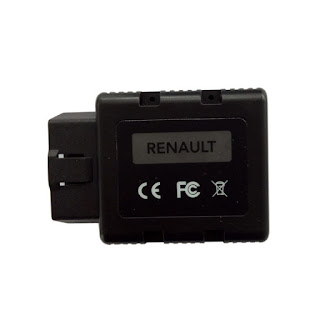
About this new tool, you can check
Renault-COM Bluetooth Diagnostic Interface better and cheaper than CAN Clip
http://blog.diyobd2.fr/2016/12/02/renault-com-bluetooth-diagnostic-interface-meilleur-et-moins-cher-que-can-clip/
How to install Renault-COM Bluetooth software?
Step1. Download Net Framework 4.0.exe or 4.0 above in your laptop in advance.
Disable ALL available networks before install or use Renault-COM software.
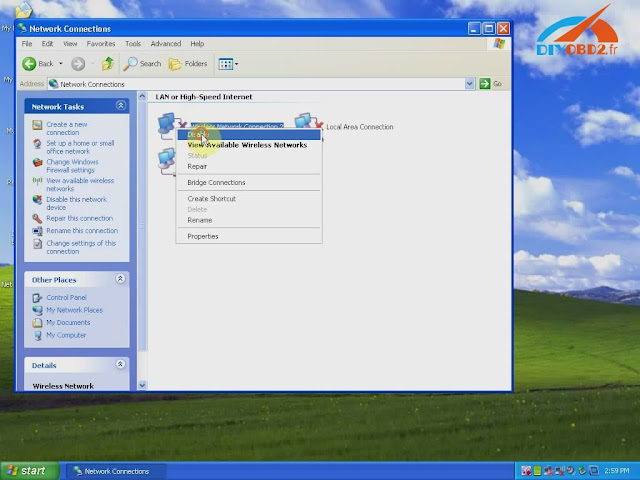
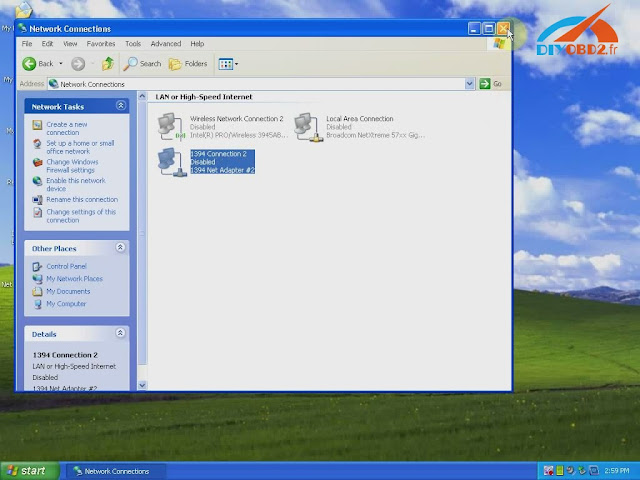
Step2. Open “My Computer” then CD-ROM “ASP_REN (E:)”, copy all files to desktop.
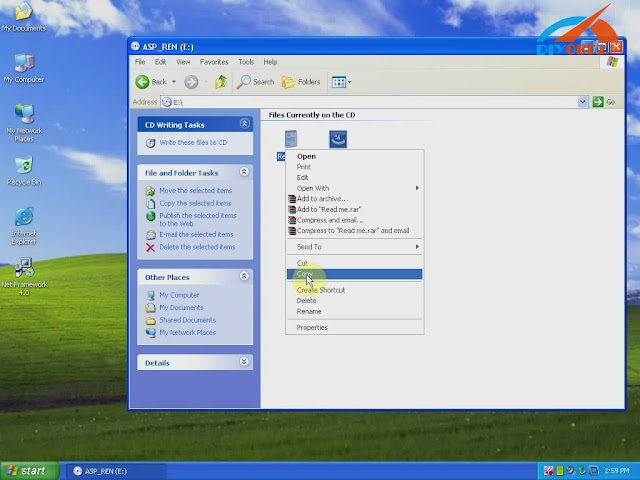
Install Net Framework: double click Net Framework software icon on desktop to start the Setup.
Step3. First check the box “I have read and accept…” then click “Install”.
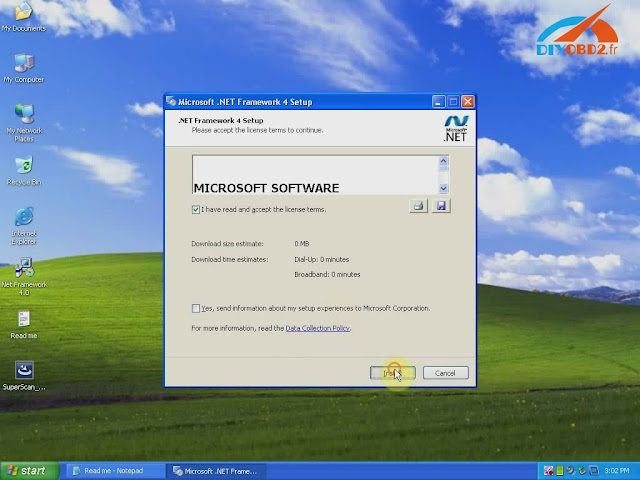
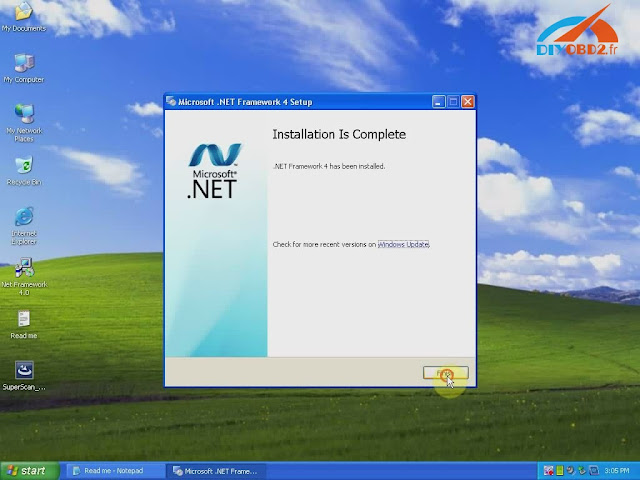
Wait a while and Net Framework installation complete, click “Finish”.
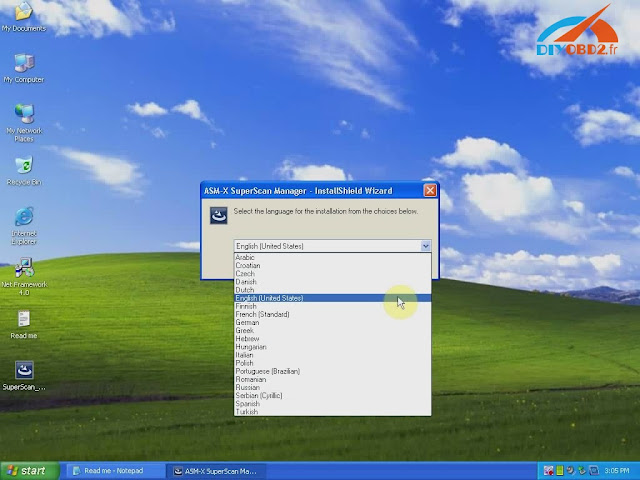
Step4. Open “SuperScan_10-02-13”, select language as English then click “OK”.
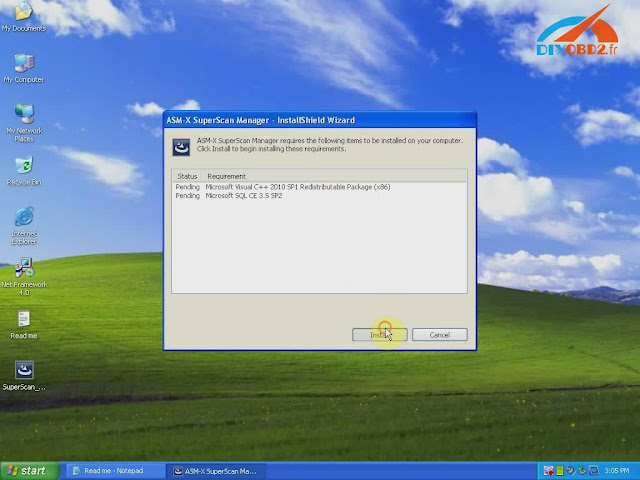
Click “Install” and wait a while, you will see the install wizard as below. Click “Next”? “I accept…”? “Next” ? “Next” ? “Install” ? “Finish”.
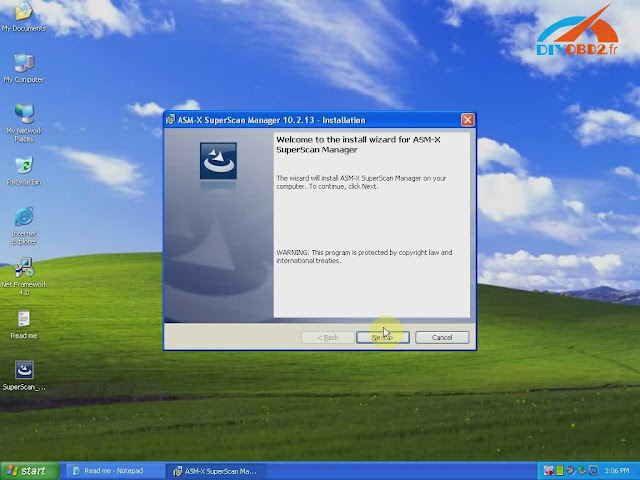
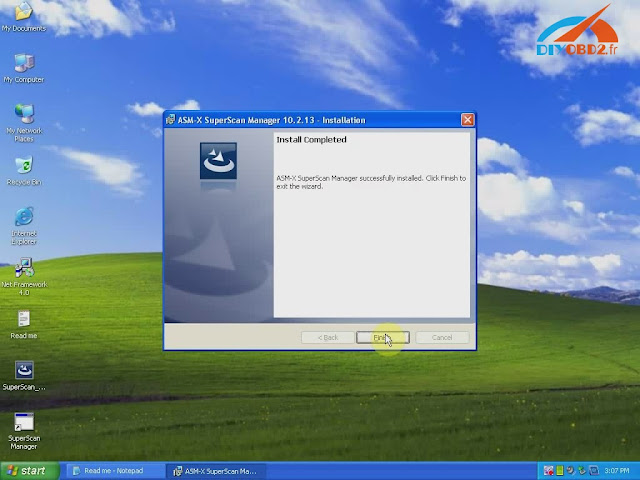
Now you install Renault-COM software successfully! Delete Net Framework and “SuperScan_10-02-13” from desktop.
How use Renault-COM Bluetooth software to diagnose Renault cars?
Before use you should set Bluetooth first!
- Click the Bluetooth icon to choose “Open Bluetooth Settings”.
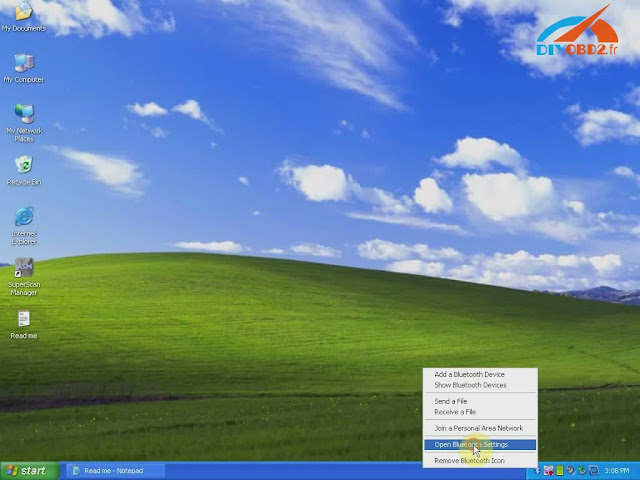
Click “Add” you will see “Add Bluetooth device wizard”, check the box “My device is set up and ready to be found” then click “Next”.
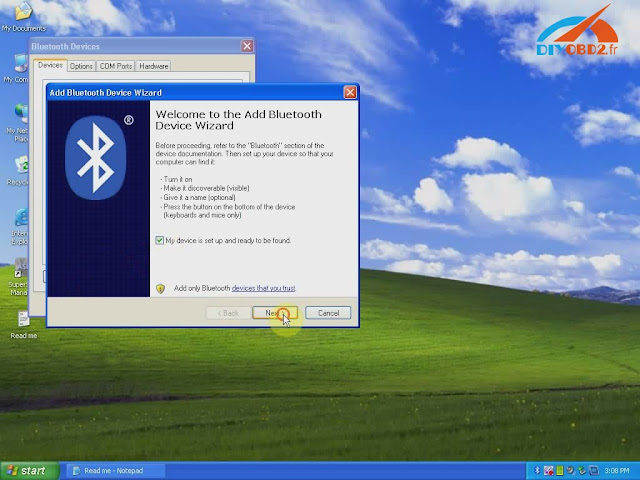
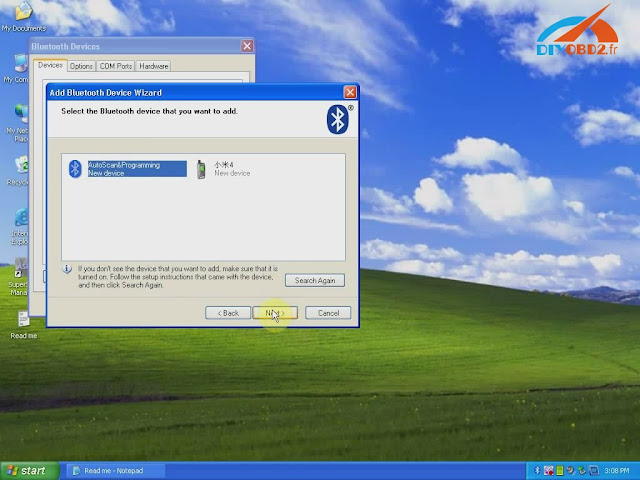
- Choose new device “AutoScan& Programming”, click “Next”.
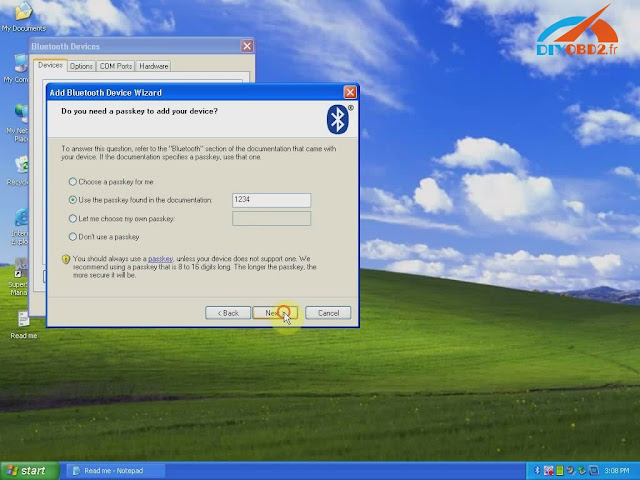
Choose the option “Use the passkey…” input “1234” then click “Next”.
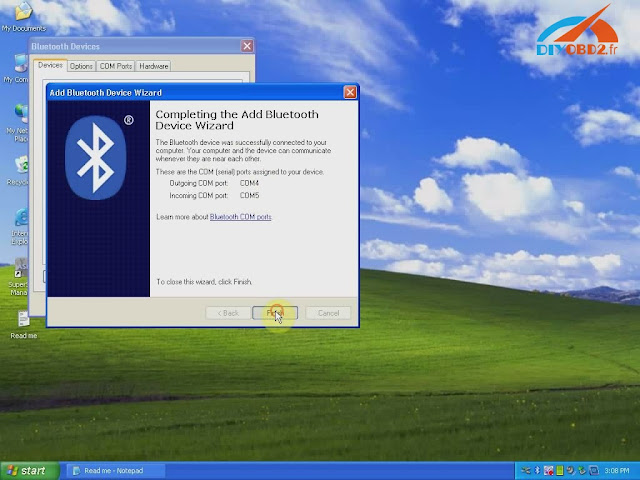
Add Bluetooth device wizard complete, click “Finish”.
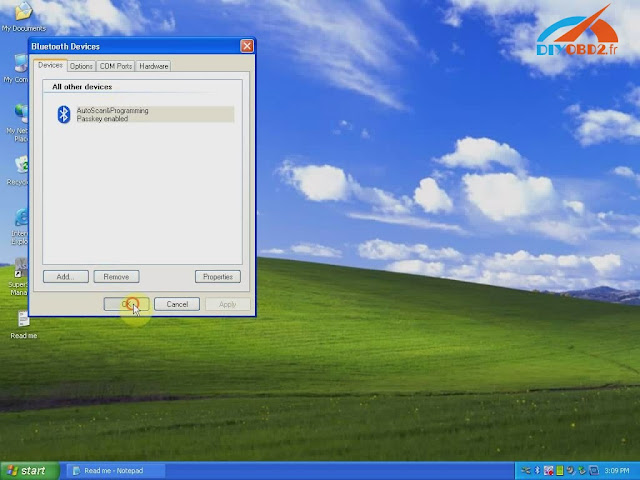
- Click Bluetooth “AutoScan& Programming” and “OK”. Now Renault-COM Bluetooth setting finish.
Open “SuperScan Manager”, choose the language you use then click “Continue”, “OK”.
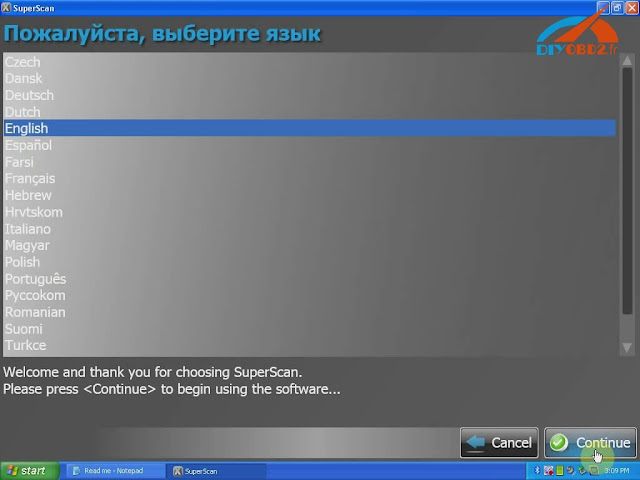
You need to fulfill personal information part. Just enter “1” in name blank and you can continue.
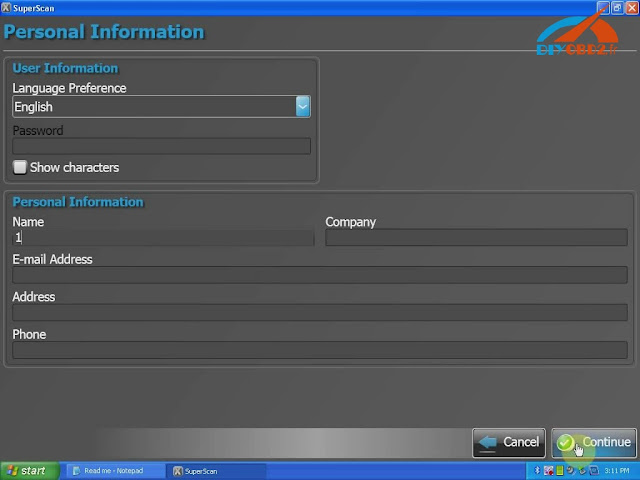
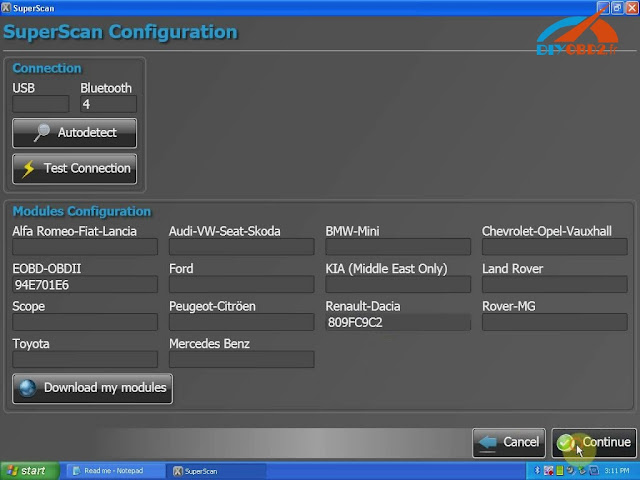
Click “Auto Detect” then “Test Connection” to test everything is OK to go on.
You should enter two activation codes, one for EOBD-OBDII, one for RENAULT. You can check them at the Read Me file.
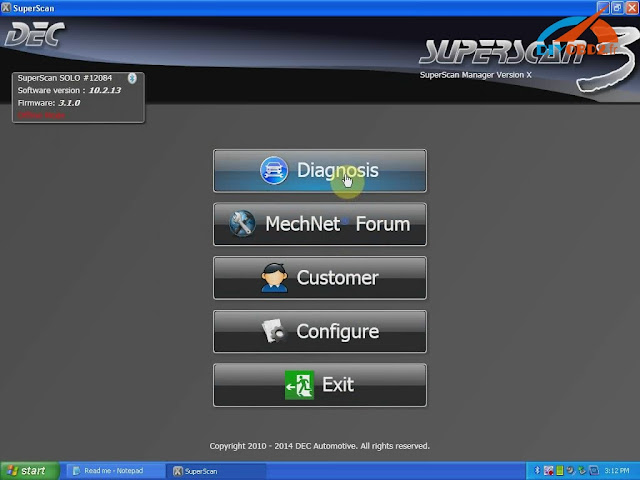
After that you can use Renault-COM to diagnose car!
Click “Diagnose”? “New Vehicle” ? “Renault” ? “Create”, now you start to use Renault-COM Bluetooth Diagnostic and programming Interface!
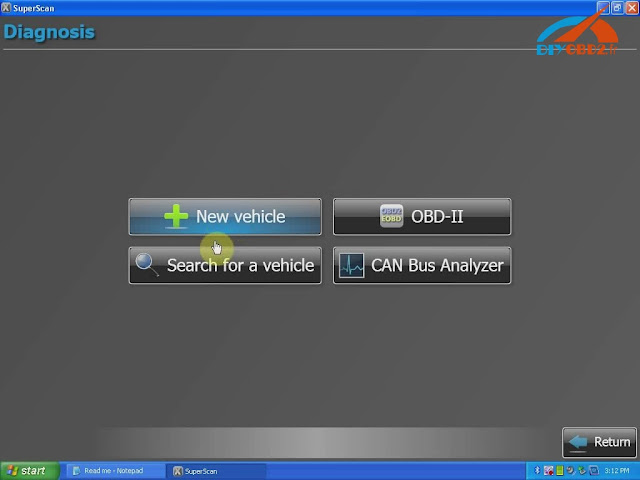
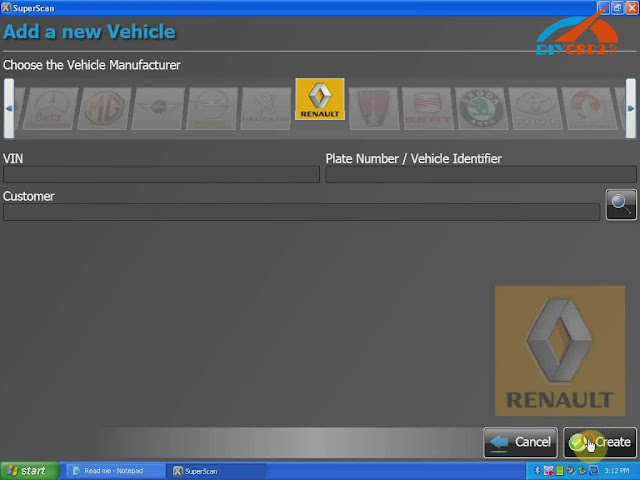
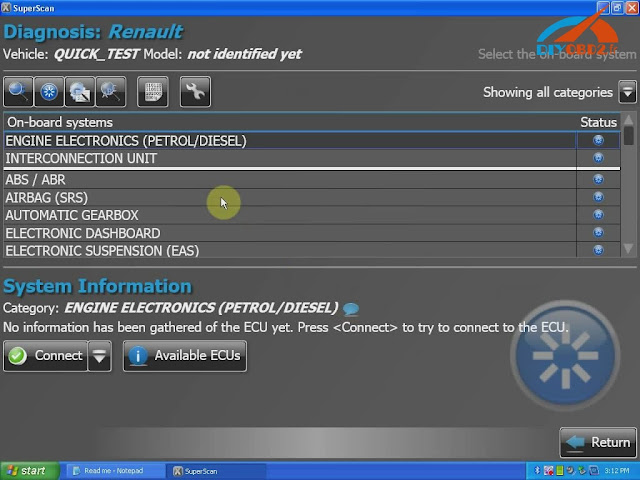
Original - from diyobd2.fr obd2 francais:How to install and use Renault-COM Bluetooth Diagnostic Interface?
Available link for download
Monday, January 30, 2017
Renault can clip reviews how to use can clip
Renault can clip reviews how to use can clip
Renault can clip reviews:
Renault can clip best price,Renault can clip best quality,Which one to choose?
Renault can clip best price,Renault can clip best quality,Which one to choose?
1.by Antonio , Jun 2, 2015
Hello.
Can Renault Can Clip reprogram the target (Key) of the scenic?
I hope your reply
Reply #1 by Summer Jun 3, 2015
Dear friend,
Nice day!
Thanks for your interest in our product.
This Renault CAN Clip cant program keys, it is for diagnose.
Regards,
Summer
2.by Mr.placido hernande , Apr 10, 2015
The quality is very good ,i have use this tool about half month ,no problem ,works stable
3.by Mr.Jason lord , Apr 10, 2015
this scanner has been more than sufficient
4.by Mr.Frank , Apr 10, 2015
Can this tool work with my Renault scenic 2001?
Reply #1 by Cindy Apr 10, 2015
Hello sir,
Thanks for your visit.
Yes, it support, you can have a try.
Regards,
Cindy
5.by Fasel chris , Apr 8, 2015
What warranty do your guys offer?
Reply #1 by Marshall Apr 8, 2015
Dear sir,
we offer one year warranty
regards
marshall
6.by Pietro roscigno , Apr 5, 2015
Che tempo ci. Vuole per arrivare diagnosi renault v146(articolo no.sp19-b) prezzo complessivo con spedizione ,verso Napoli.grazie
7.by MAX AUTO , Mar 23, 2015
What can I do with this error "please contact the SPX helpline" ?
Reply #1 by Marshall Mar 23, 2015
Dear sir
this is your system problem,you need change to XP system SP3
regards
marshall
8.by Fabio Uitursl , Dec 30, 2014
Can can clip work for my 2010 Renault Scenic III (JZQN type) electrics rear brakes?
Reply #1 by Marshall Dec 30, 2014
sorry,it cannot do
regards
marshall
9.by Mr.Lyle , Dec 30, 2014
When I try to program with Renault CAN Clip, no communication, whats the problem?
Reply #1 by Cindy Dec 30, 2014
Dear sir,
Thanks for your visit.
I am sorry Renault CAN Clip we supply only support diagnosis, not support programming.
Hope you can understand.
Regards,
Cindy
10.by Mr.Luis Tomé , May 20, 2014
hello what is the diferences in A and B versions in renault can clip
Reply #1 by Marshall May 20, 2014
dear sir
thanks for your mail
for function they are same,i advise you buy A version now,as A version is 1:1 clone of the original with AN2135SC Chip
see this article:
Renault Can Clip 1:1 clone of the original with AN2135SC Chip
have a nice day!
marshall
i originally tried using a notebook but the screen res was too small. also you will probably need a built in serial port, which does limit the laptops available, as usb serial port.
chinese prolific cheap knock off clone types tend not to work well, as prolific have boobytrapped their drivers to do a self test and if they fail they generate an error 10 in windows.
the serial port is needed if you have other plugin tools that need to be used on the car.
11.mord:
users need a laptop with a 1024x768 screen or higher, it needs XP to SP3 installed, all the extra updates shouldnt make any difference.
the reno applications all overlay over each other, so i think the full package comes in a number of cd/DVD bundles for each model of car covered, so a dedicated laptop is probably recommended, and doing the installation would be fine
the reno applications all overlay over each other, so i think the full package comes in a number of cd/DVD bundles for each model of car covered, so a dedicated laptop is probably recommended, and doing the installation would be fine
i originally tried using a notebook but the screen res was too small. also you will probably need a built in serial port, which does limit the laptops available, as usb serial port.
chinese prolific cheap knock off clone types tend not to work well, as prolific have boobytrapped their drivers to do a self test and if they fail they generate an error 10 in windows.
the serial port is needed if you have other plugin tools that need to be used on the car.
Edit:
for key coding you really should go to a certified autolocksmith, or you could try contacting someone on another garage forum to buy one-shot pre-purchased licenced authorisation keys to do it.
though your still better off going to someone in the autolocksmith business. (at least that way you wont get ripped off or sold dud keys.)
they are good for basic diags of what is a complex bit of kit, it really is a shame that the measurement unit is not available.
though your still better off going to someone in the autolocksmith business. (at least that way you wont get ripped off or sold dud keys.)
they are good for basic diags of what is a complex bit of kit, it really is a shame that the measurement unit is not available.
Edit:
can reprogram the speedo to kmh from mph, by setting the country on the speedo options, but won’t be able to revert it back. (i have been told it is possible, but im not holding my breath) it would be cheaper to buy another similar speedo off another car in a breakers yard(about 30 to buy) (either as the one to be initially reprogrammed or as one to fall back to when you get back to the UK.)
12.Talvin:
Yes, chinese can clip can do most of the functions, changing parameters, actuation, coding injectors, throttle body learning etc.The only thing you wont be able is reprogramming engine ecu and uch and retrieving pincodes to program cards and keys(replacing by new ones).To get pincode is very easy if u know your electronics,just read from ecu -not from uch ,much easier to read from ecu as eeprom is more easy to read than MCU.read dump send to icc within hours youll recieve 12 digit pin,and use clip or sbb to program.There r ways to clone uch or ecus but u need right tool and gud at Electronics,noneed to go dealer,never,from myself 19 years working for Renault as technical coordinator.
13.dejan72:
There is a V4 of AUTOFORMATION but i didnt learn much from it although if you know nothing at all its a start.
Ive done some testing on Clio 1, 2 ,Lag 1, 2 ,meg 1, 2. Readjusted my xenons, its good (a must) for bleeding abs brake systems with its actuator tests, tested egr valve with actuator test, entered new valves into TPMS, checked the turbo pressure (can record data off a couple of sensors and store those graphs so you can evaluate it after, for instance speed, rpm, manifold pressure, turbo pressure, throttle position) after new turbo exchange on meg1 dci.
Ive done some testing on Clio 1, 2 ,Lag 1, 2 ,meg 1, 2. Readjusted my xenons, its good (a must) for bleeding abs brake systems with its actuator tests, tested egr valve with actuator test, entered new valves into TPMS, checked the turbo pressure (can record data off a couple of sensors and store those graphs so you can evaluate it after, for instance speed, rpm, manifold pressure, turbo pressure, throttle position) after new turbo exchange on meg1 dci.
14.Quite a nice toy.For other tests like compression test, voltage and some others a secondary unit attached to the Clip is needed i guess.
And of course it works on windows XP only so if on vista or 7 make a dual boot.
And of course it works on windows XP only so if on vista or 7 make a dual boot.
15.Gogslad:
Yip, ive got one, it does every thing the dealer tool does, inc code keys and uch if you have the immob code, done every thing ive asked it to do so far, and thats a lot. Had it about a year now. Got it off obdii365.com for some dollars. paid for itself several times now.
16.Thomasrhomstein:
I bought to that tool. It good for obd testing and quick multiplex diagnose. If you whant to reprog something it asks for a instrument code (7 numbers) and ... I dont know much. I heard that it also asks for other unit code like diesel injection,uch reprogram and radio code. If someone can help me Ill be forever grateful to him. I have Clip v74, v85, v95. Reprog v60 and v83.
17.hoochy:
its much better than a lot of fault code readers out there i also say only use it as a starting point to read codes etc it will not do new key cards it all depends on what you want/use it for if you have a local garage thats cheaper than the main dealer id say use them first
18.mickpm:
I can see why the cloned Clip may look attractive for DIY work. Theyre made by illegally copying the hardware/software by deconstructing and remaking them in a similar way to how cassettes are copied. So, it’s much cheaper than the genuine. but some "Chinglish" can creep in during the process so you cannot be sure that the unit or the software will function properly.
19.Eloff7:
The clone clips work very well with the genuine software. the Chinese software is loaded with bugs. I was fortunate to get a complete genuine set of software and a genuine can clip from a bust garage in another country, so tipped the software from the cloned unit, and used the cloned unit plus the genuine unit on my software.
It has proved invaluable to me with rebuilding Renaults, and both units allow me to do the full spectrum of work and reprogramming. I would purchase the clone from fleabay, but then try and get a set of genuine discs, from someone you know, and use that rather than the software that comes with the cloned unit.
I would be careful scratching around thought, as a wrong setting will immobilise the car, then you would have to re-flash the ECU or BCM unit.
It has proved invaluable to me with rebuilding Renaults, and both units allow me to do the full spectrum of work and reprogramming. I would purchase the clone from fleabay, but then try and get a set of genuine discs, from someone you know, and use that rather than the software that comes with the cloned unit.
I would be careful scratching around thought, as a wrong setting will immobilise the car, then you would have to re-flash the ECU or BCM unit.
20.Why do I need to buy renault can clip and nissan consult 3 2 in 1?
CAN CLIP and Nissan Consult 3 Use the same hardware
Yes,and Renault can clip hardware is good for nissan consult 3 software,it is able to diagnose nissan cars with renault can clip hardware!!! (sp19-b and sp38-b, Renault CAN Clip V163 And Nissan Consult 3 2 in 1 sp259)
very well and cheaper
very well and cheaper
Or if you only have one product, you can buy another one can clip or Consult 3 (sp38-b)
I have the Can Clip it does all I need it to on my Megane as for diagnosing it will do it as long as you have a PC that includes its software. The main reason I got Clip is it covers all the rovers so the MRS, MGF, I can sort out when the car ever goes wrong and it never let me down.
The DDT2000 actually does not pass the test. I have got a MAF sensor disconnected and the software is not able to read it. It just states that no errors are present but in fact there is something going on. Then I plugged ELM327 scanner and run its software, there it is the fault present. For now the price is the only good thing, but so is the ELM327 cable and way more easy to use.
Conclusion:
21.Can Clip VS Multidiag Pro VS DDT2000
I have the Can Clip it does all I need it to on my Megane as for diagnosing it will do it as long as you have a PC that includes its software. The main reason I got Clip is it covers all the rovers so the MRS, MGF, I can sort out when the car ever goes wrong and it never let me down.
About Multidiag Pro and Clip, I think the biggest difference is their vehicle coverage. Multidiag Pro is universal (works in a very large car brands), while Clip is for Renault cars. Besides, Multidiag Pro is cheaper than Clip.
The DDT2000 actually does not pass the test. I have got a MAF sensor disconnected and the software is not able to read it. It just states that no errors are present but in fact there is something going on. Then I plugged ELM327 scanner and run its software, there it is the fault present. For now the price is the only good thing, but so is the ELM327 cable and way more easy to use.
Conclusion:
Renualt CAN CLIP and Multidiag Pro are clearly above DDT2000 and both can do
Read more »
Available link for download
Wednesday, January 25, 2017
Lexia 3 Diagbox v7 76 how to install use diagnose Peugeot Citroen
Lexia 3 Diagbox v7 76 how to install use diagnose Peugeot Citroen
Diagbox v7.76 is the newer diagnostic software, compared with PP2000. It runs fast and is easy to use on laptops for Peugeot & Citroen, replacing Peugeot Planet & Citroen Lexia. And Diagbox also provides most dealer functions at a fraction of the price involved with hiring the system from Peugeot or Citroen dealers.

Software version:
Diagbox v7.76
Operating system:
Windows XP (runs well);
Virtual machine on Windows 7;
Windows 10 64 Bit (tested with Diagbox 7.65 by customers);
Installation:
Step 1 – Install DAEMON Tools Lite
Step 2 – Install Diagbox
Step 3 – Activate Diagbox
Step 4 – Update Diagbox to v7.57
Step 5 – Update Diagbox to v7.58
Step 6 – Update Diagbox to v7.62
Step 7 – Update Diagbox to v7.66
Step 8 – Update Diagbox to v7.74
Step 9 – Update Diagbox to v7.76
Step 10 – Run Diagbox 7.76 to diagnose Citroen XM
Update:
you have to do the updates manually for Diagbox.
And when you update from V7.02 the file APPDIAG.SYS gets deleted.
So before update back up your APPDIAG.SYS file (In C:AWRoot infi)
And when you update from V7.02 the file APPDIAG.SYS gets deleted.
So before update back up your APPDIAG.SYS file (In C:AWRoot infi)
Cost Effective Diagnostics:
Don’t be fooled into believing Diagbox needs a Toughbook to run, it doesn’t. BBA provide high spec, durable laptops perfect for use with Diagbox, and just as important they save you considerable expense. Save even more money by adding the Diagbox to one of our other diagnostic packages, and run various diagnostics software on a single laptop. Our expert software engineers can put a package together to suit your exact diagnostic requirements.
Function list:
Diagbox is the quick and easy way to keep customers happy by offering functions below:
- Automatic vehicle recognition
- Auto scan complete vehicle or individual ECU modules
- DTC reading and removal
- Wide range of actuator tests
- Complete list of live data streaming for all main ECU’s
- Recordable / playback of live data
- Programming and installation of most new ECU’s
- Programming keys
- Setting / removing speed limiters
- DPF regeneration & fluid additive correction
- Any many more money making functions
- Auto scan complete vehicle or individual ECU modules
- DTC reading and removal
- Wide range of actuator tests
- Complete list of live data streaming for all main ECU’s
- Recordable / playback of live data
- Programming and installation of most new ECU’s
- Programming keys
- Setting / removing speed limiters
- DPF regeneration & fluid additive correction
- Any many more money making functions
Latest Models Covered

Diagbox is able to diagnose the latest Peugeot and Citroen models including; DS3, DS4, RCZ, & Tepee. We can also supply the additional cable required to communicate with Peugeot and Citroen light commercial vehicles such as the Boxer 3, Bipper, Jumper 3, and Nemo.


Lexia 3 (xs evolution supporté) V48 PP2000 V25 avec Diagbox V7.76 Série 921815C / Firmware Support Peugeot 307:
http://www.diyobd2.fr/wholesale/lexia-3-pp2000-citroen-peugeot-diagnostic-interface.html
This is from diyobd2.fr website technical support: Lexia 3 Diagbox v7.76, how to install/ use/ diagnose Peugeot & Citroen
Available link for download
Subscribe to:
Posts (Atom)