Showing posts with label management. Show all posts
Showing posts with label management. Show all posts
Monday, March 13, 2017
Tekoa ERP Mobile Warehouse Management
Tekoa ERP Mobile Warehouse Management
Increase Accuracy and Inventory Controls with Mobile Inventory Management
By: Tekoa SoftwareProduct inventory represents one of the largest investments for a Distribution or Manufacturing business. Tekoa ERP Mobile Warehouse Management helps you increase the accuracy and efficiency of inventory quantities so you can increase the control of inventory procedures and better manage inventory values.
Here are some of the advanced features of Tekoa ERP Mobile Warehouse.
| |||||
|


Mobile ReceivingDesigned for quick and easy input, Tekoa Mobile Receiving allows mobile users to scan in items received and enter the appropriate quantity. Tekoa automatically validates the scan to let the user know if the code scanned is recognized after comparing the entry against product identity aliases.Mobile users can view and edit in process receipts and a running total of total quantity received is clearly visible for easy visual validation. |  |
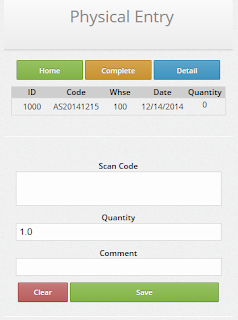 | Mobile Physical CountInventory Physical Count Entry is also optimized for rapid data entry when the mobile user scans a product bar code and enters a physical count quantity. Scanned product codes are then validated against known item aliases and visual confirmation is provided to the user.Physical Count entries are collected in groups by warehouse where count entries can be maintained by managers and posted once the entire physical count is completed. |
Mobile Manufacture Operation EntryTekoa Mobile makes it fast and simple to track production costs by allowing mobile users to scan production step operation codes from a Production Ticket or Traveler document.Using the Production Route established for the Finished Good, Tekoa Mobile automatically processes one, or multiple cascading production steps recording production costs - with just ONE scan required by the production mobile user. Intended for fast and easy data entry, processing production costs cant get any easier. |  |
 | Mobile Point of SaleOne of the most powerful features of Tekoa Mobile is the Point of Sale Entry function.Using Tekoa Mobile POS, users have the ability to:
|
Tekoa ERP is mobile optimized, which means it is built with mobile technology in mind and works on mobile devices, phones, tablets as well as computers. That said, the above listed functions are specifically designed for use in Inventory Warehouse Management and incorporate the use of bar code scanning and rapid data entry.
For more information about Tekoa Mobile Warehouse Management, visit us online at www.TekoaERP.com.
Available link for download

Saturday, March 4, 2017
ERP Business Process Management
ERP Business Process Management
Essentials of Business Process Management (BPM)
 |
| www.TekoaERP.com |
While running a business, there are several objectives an owner needs to do while attempting to gain a profit. One of the most important things is being able to multitask and supervise at all ends of the spectrum. Whether that be sales, marketing, or communications, it is crucial that an owner is aware of his company at all times.
However, one section tends to get looked over, and because of this, problems often occur. Business process management (BPM) is a section that each company should be improving on a day-to day basis. This section is responsible for defining a companys problems, and creating ways to get rid of these complications.
There are a number of business process problems that occur in todays world, and it seems that although companies grow more aware of them, they dont do much to stop them. The following paragraphs will list some of the problems that modern businesses face:
Lack of technological improvement:
Nowadays, many companies are refusing to input all documents on some sort of e-file, and continue to keep their information on physical paper. Although this isnt a bad idea, it can lead to data theft, human error, and even lost files. If a company switches to digital information, it can be accessed from multiple locations and organized in a much simpler way.Defensiveness:
This may sound like a confusing statement, but its meaning is crucial to a business. A company needs to be defensive and prepared for when things dont go as expected. Many companies take huge hits when they arent prepared and their plan is disrupted. In order to cope with this action, it is wise for a company to create some sort of plan or method to act on when the worst occurs.Speed:
One of the most important aspects in any business is giving the client or customer whatever they want in the quickest and most efficient way possible. This being said, many companies are unaware that their speed of delivery could improve. Not only could the speed of delivery to the client be improved, but other aspects within the company can be enhanced as well. In order to increase efficiency, companies should create plans that can adapt easily to the constant change of the business world.Identification:
It is vital for companies to pay attention to what stakeholders want and need, because these individuals have a big impact on the firms financial position. Many businesses arent aware of a stakeholders needs when in reality this should be a top priority. Because they play such a crucial role, it is important to keep them satisfied to prevent concerns from appearing that can ultimately throw off the potential of a specific implementation or business action.Jesse Salzwedel is a business and accounting specialist at Whitworth University.
Available link for download
Saturday, February 4, 2017
Achieve Business Growth with Wise ERP Management
Achieve Business Growth with Wise ERP Management
Business Growth with Wise ERP Management
By: Ian Wanamaker?
 |
| www.TekoaERP.com |
The best problem you can have in businessis that your company is gettingbig, bigger than you ever imagined, too big maybe. This is the "problem" that Goldbelt Incorporated is currently facing. For the last two summers I have worked as an intern with Goldbelt,most recently in the accounting department, Goldbelt is a regionalAlaska Native Corporation formed under ANCSA(the Alaska NativeClaims Settlement Act). Goldbelt made its start as a corporation in 1971when the federal government issued them a chunkof land, a lump sum of cash, and many shareholders. From those humble beginnings Goldbelthas grown into an international Corporation based in Alaska but with headquarters in Virgina, and subsidiaries around the U.S and some in South America.
As you can imagine, it gets a little hectic.Thats why Goldbeltis opening a central service center.This central service center will provide book keeping. and business and management analysis,as well as provide a service center for life insurance and other benefits.While this center is still in the development stages management is planning to operate in the cloud so that each subsidiaryand each department can have real time access to information they need. This will also eliminate the inconvenience of sending physical file folders, or emails containing zip file on top of zip file (as I had to do many times as an intern).
In conclusion, by operating in the cloud, and centralizing their ERP Goldbelt is going to be able to manage its growth, upgrade their ability to analyze information, and probably save themselves some money (as well as a headache) in the future. This overhaul is still taking place, but it is a big step in the right direction.
Ian Wanamaker is a business and accounting specialist at Whitworth University
Available link for download
Sunday, January 22, 2017
Simple Tips for Improving ERP Inventory Management
Simple Tips for Improving ERP Inventory Management
Improve Inventory Management Business Processes
 |
| www.TekoaERP.com |
By: Amy Sterk
What is a “business process?”
The different kinds of business processes are the different tasks and actions that are performed in order for a business to operate and provide their product or service. Even though each organization will have its own version and alterations on their business processes, the three that are considered to be the fundamental processes are, procurement process, production process, and fulfillment process.What is the fulfillment process?
Considered to be the third of the core processes, in the fulfillment process the products or services are delivered to the consumer or buyer. The fulfillment process is broken down into the steps of; Receive Customer Order, Prepare Shipment, Send Shipment, Send Invoice to Customer, and Receive Payment. Of course, each of these steps has many different aspects and variables depending on the nature of the business and the products/ services being produced. How to enhance the fulfillment process
When trying to specialize your company’s fulfillment process, one must go through each of the steps that must be taken in order to provide your product/ service to your customers. In this case, we will use the standard steps that are provided by the book. Keep in mind that your company may have alternative steps, as well as more or less due to different needs and practices. Receive Customer Order: What process does your company use to take customer orders? Is it the most effective and convenient for your customer base? For example, if a company requires a customer to fill out a paper order form and either mail fax or deliver it to their store this company might benefit from researching and using an online source to allow customers to place orders through the internet. This switch could also benefit the company by giving the ability to sort and organize the information from the order much easier and quicker than if they received the order on a hard copy.
Prepare Shipment: In this step, organization and communication is essential. Communication between the people in charge of receiving and sorting out orders and the people putting the orders together makes or breaks this stage. Miscommunication can lead to unfulfilled orders and unhappy customers. Send Shipment: the method of shipment is a big choice. If the company is large enough and has enough shipments, it could be beneficial for it to invest in organizing their own transportation or if not, the company could pair up with a business that specializes in transportation. This outsourcing could save them money and unnecessary efforts, but the company should be aware and monitoring its many different options in sending the shipment.
Send Invoice to Customer:this step could also be enhanced if the company is using hard copies and sending this information strictly through mail, or delivery. By using technology and the internet a company could switch to electronically sending invoices and saving time as well as money.
For more information about Improving Inventory Management for your enterprise, check out the tools from Tekoa Software at www.TekoaERP.com .
Available link for download
Subscribe to:
Posts (Atom)