Showing posts with label history. Show all posts
Showing posts with label history. Show all posts
Saturday, February 25, 2017
How to delete Quick Access History in Windows 10 Updated
How to delete Quick Access History in Windows 10 Updated
Quick Access is the option used to quickly access our favorite folders or files. But they hadnt
included an option that asks us is this files need to be displayed in quick access or not, atleast it
would be better for some if they had designed without quick access as well. But they hadnt done
that, instead they did a program inside windows which will automatically display the recently
opened files in quick access of Windows 10.
So,if you wish to delete quick access history of Windows 10 or clear quick access history of
Windows 10 (i think both are same??) here is an guide on how to do.. Remember you dont need
registry or gpo to carry out the following task.
How to clear or reset quick access recent files history in Windows 10
1) Press Windows + E Keys ( its a shortcut for Opening This PC)
2) Click on the File tab, which will be on the top left corner
3) When you clicked it will display open new Window,Open command prompt,etc options..
Click on the Change folder and Search Options.
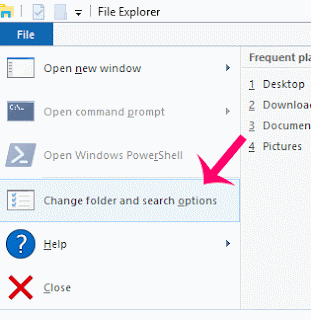
4) it Will open a new window, named folder Options.
On that,click on the general tab and find an option called Privacy
5) under Privacy, you can see two checkbox options
Show recently opened files in quick access and show frequently used folders in Quick Access
6) Just uncheck the boxes and click Apply and OK.
Thats it..
included an option that asks us is this files need to be displayed in quick access or not, atleast it
would be better for some if they had designed without quick access as well. But they hadnt done
that, instead they did a program inside windows which will automatically display the recently
opened files in quick access of Windows 10.
So,if you wish to delete quick access history of Windows 10 or clear quick access history of
Windows 10 (i think both are same??) here is an guide on how to do.. Remember you dont need
registry or gpo to carry out the following task.
How to clear or reset quick access recent files history in Windows 10
1) Press Windows + E Keys ( its a shortcut for Opening This PC)
2) Click on the File tab, which will be on the top left corner
3) When you clicked it will display open new Window,Open command prompt,etc options..
Click on the Change folder and Search Options.
4) it Will open a new window, named folder Options.
On that,click on the general tab and find an option called Privacy
5) under Privacy, you can see two checkbox options
Show recently opened files in quick access and show frequently used folders in Quick Access
6) Just uncheck the boxes and click Apply and OK.
Thats it..
Available link for download

Sunday, February 19, 2017
How To Speed Up Invoice History in Sage ERP 100 MAS
How To Speed Up Invoice History in Sage ERP 100 MAS
How you can purge Accounts Receivable Invoice History in Sage ERP 100 MAS90 MAS200 and still be able to access to the data.
By: Kevin Conlin
Do you have large volumes of A/R History Invoices in your Sage ERP 100 files? Does the lookup cause delays for your MAS users? But you don’t want to lose the ability to be able to view and print history invoices.
Here’s what we’ve done at Tekoa Software to make this a reality.
The Accounts Receivable / Sales Order invoice history tables are updated nightly to an external SQL database [a non-MAS table] automatically [via a SQL script]. A Crystal Report has been designed along with parameter fields to select customer invoices to be viewed or printed from the SQL database. Older A/R invoice history can then be purged using the Account Receivable Utilities. This speeds up the lookup process for Invoice History Inquiry and allows users to print and email more recent invoices from the MAS interface.
For example, the external SQL database maintains a perpetual invoice history table, while within MAS we purge invoice history leaving only the most recent 2 years of data. For older invoices, they can be printed from either an option on the MAS task menu, or a simple user interface, retrieving the desired invoice from the external SQL history tables. The user interface is easily modified to add selection options by customer number, invoice number, and invoice date [or additional search fields].No changes or modifications to the Sage code, and access to needed history transactions with the speed and reliability of SQL. In addition, the Express versions of Microsoft SQL are free of charge and can perform this functionality without any additional software cost.
For more information about how to save MAS90 and MAS200 AR Invoice History in SQL and speed up MAS inquiries by purging, contact Tekoa today.
Author: Kevin Conlin
Sage ERP 100 Business Analyst and Software Consultant
www.TekoaSoftware.com
Available link for download
Saturday, February 4, 2017
Extensions tab on history window missing in Chrome 55 and later Solved Here is a way to launch extensions again
Extensions tab on history window missing in Chrome 55 and later Solved Here is a way to launch extensions again
Where are my extensions in chrome, where is the about button in chrome - thats what people are
searching in Chrome 55 which can be downloaded using official site google.com/chrome.
Recently if you had updated your google Chrome then, you may be aware of this. Google redesigned
the Chromes History tab as it replaced it with the complete material design. The chrome 55 update
also features some bug fixes, but the popular extensions and about tabs are missing in Chrome
version 55 and later in the history window.
So, in this post lets see how to access extensions tab, where extensions in chrome located and how to
access extensions in Chrome.
What is mean by extensions ?
As the name suggests, extensions are nothing but the additional things that help the user to add some
more facilities the browser lacks. For example : In Some btowsers, the translate of page is done by
the extensions.So they are simply the additional facility that can be downloaded and installed.
In Chrome, they are available in .crx files, Which means when you download chrome extension you
will see the filename .crx files downloading..
Where are my extensions in Chrome ?
They are located inside the Chrome folder which would be on many locations like AppData,
program files and so on.
How can i find extensions on Chrome ?
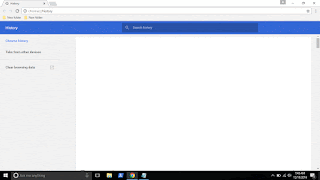
In the earlier versions of Chrome, you can see the Chrome extensions tab available on the history tab
which can be opened by simply pressing ctrl + H keys on keyboard. But in the update the extensions
tab was removed so, you cant open it using that method, you need to follow the main method...
1) Open Google Chrome.
2) On the top right corner, you will see the ? icon click on it..
3) It will display many options like New tab, New Windows,etc.. Find More tools option and click
on it.
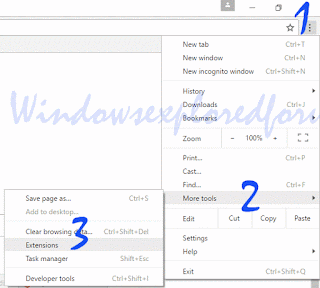
4) When you clicked it will open more options now like Save page as, Add to desktop, Clear browsing data, extensions, etc..
5) Click on Extensions
Thats it..
You will find all your Extensions there...
Thats the end of this post..
Click to read all basic tutorials..
searching in Chrome 55 which can be downloaded using official site google.com/chrome.
Recently if you had updated your google Chrome then, you may be aware of this. Google redesigned
the Chromes History tab as it replaced it with the complete material design. The chrome 55 update
also features some bug fixes, but the popular extensions and about tabs are missing in Chrome
version 55 and later in the history window.
So, in this post lets see how to access extensions tab, where extensions in chrome located and how to
access extensions in Chrome.
What is mean by extensions ?
As the name suggests, extensions are nothing but the additional things that help the user to add some
more facilities the browser lacks. For example : In Some btowsers, the translate of page is done by
the extensions.So they are simply the additional facility that can be downloaded and installed.
In Chrome, they are available in .crx files, Which means when you download chrome extension you
will see the filename .crx files downloading..
Where are my extensions in Chrome ?
They are located inside the Chrome folder which would be on many locations like AppData,
program files and so on.
How can i find extensions on Chrome ?
In the earlier versions of Chrome, you can see the Chrome extensions tab available on the history tab
which can be opened by simply pressing ctrl + H keys on keyboard. But in the update the extensions
tab was removed so, you cant open it using that method, you need to follow the main method...
1) Open Google Chrome.
2) On the top right corner, you will see the ? icon click on it..
3) It will display many options like New tab, New Windows,etc.. Find More tools option and click
on it.
4) When you clicked it will open more options now like Save page as, Add to desktop, Clear browsing data, extensions, etc..
5) Click on Extensions
Thats it..
You will find all your Extensions there...
Thats the end of this post..
Click to read all basic tutorials..
Available link for download
Subscribe to:
Posts (Atom)