Showing posts with label access. Show all posts
Showing posts with label access. Show all posts
Saturday, February 25, 2017
How to delete Quick Access History in Windows 10 Updated
How to delete Quick Access History in Windows 10 Updated
Quick Access is the option used to quickly access our favorite folders or files. But they hadnt
included an option that asks us is this files need to be displayed in quick access or not, atleast it
would be better for some if they had designed without quick access as well. But they hadnt done
that, instead they did a program inside windows which will automatically display the recently
opened files in quick access of Windows 10.
So,if you wish to delete quick access history of Windows 10 or clear quick access history of
Windows 10 (i think both are same??) here is an guide on how to do.. Remember you dont need
registry or gpo to carry out the following task.
How to clear or reset quick access recent files history in Windows 10
1) Press Windows + E Keys ( its a shortcut for Opening This PC)
2) Click on the File tab, which will be on the top left corner
3) When you clicked it will display open new Window,Open command prompt,etc options..
Click on the Change folder and Search Options.
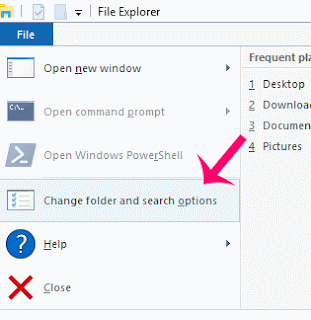
4) it Will open a new window, named folder Options.
On that,click on the general tab and find an option called Privacy
5) under Privacy, you can see two checkbox options
Show recently opened files in quick access and show frequently used folders in Quick Access
6) Just uncheck the boxes and click Apply and OK.
Thats it..
included an option that asks us is this files need to be displayed in quick access or not, atleast it
would be better for some if they had designed without quick access as well. But they hadnt done
that, instead they did a program inside windows which will automatically display the recently
opened files in quick access of Windows 10.
So,if you wish to delete quick access history of Windows 10 or clear quick access history of
Windows 10 (i think both are same??) here is an guide on how to do.. Remember you dont need
registry or gpo to carry out the following task.
How to clear or reset quick access recent files history in Windows 10
1) Press Windows + E Keys ( its a shortcut for Opening This PC)
2) Click on the File tab, which will be on the top left corner
3) When you clicked it will display open new Window,Open command prompt,etc options..
Click on the Change folder and Search Options.
4) it Will open a new window, named folder Options.
On that,click on the general tab and find an option called Privacy
5) under Privacy, you can see two checkbox options
Show recently opened files in quick access and show frequently used folders in Quick Access
6) Just uncheck the boxes and click Apply and OK.
Thats it..
Available link for download

Friday, January 27, 2017
I 2013 Multidi g Access Communication Error after Update
I 2013 Multidi g Access Communication Error after Update
I-2013 mutidiag access failed to communication after update. And here are professional suggestion by diyobd2.fr. Hopefully, it helps someone.

Mise a jour de linterface de communication
(Updating the communication interface)

Erreur pendant le telechargement de la vci. Verifiez que la vci est connectree a l’outil et au vehicule.
(Error while downloading vci. Verify that the vci is connected to the tool and the vehicle.)
Suggestion from professional technicians work for diyobd2.fr:
1- try to re-install windows system (Windows XP or Win7 32bitbetter)
1- try to re-install windows system (Windows XP or Win7 32bitbetter)
2- disconnect network connection
3- re-install Multidiag access i-2013 according to the video guide below:
http://youtu.be/vc8aQxOMP_A
4- then it should work fine.
If the Multidiag i-2013 still fails to connection, please send your unit back to the vendor for repair.
To update Multi-diag software needs technique and luck:
You need to buy the corresponding chip to change it on the board, before software update.
V2011 update chip for Multi-Di@g J2534 Interface

This is the PIC12F629 chip for Multi-diag j2534 to update your tool from 2010 to 2011.
V2013.1 update chip for Multi-Di@g J2534 Interface

With this update chip, you can update your Multi-Diag j2534 interface from V2010 V2011 to V2013.1.
Tutorial: How to update Multi-Diag J2534 interface to v2013 v2011
Note: when use i-2013 multidi@g to test the car, it’s a must to setup the USB driver first.
Original - from diyobd2.fr obd2 francais:I-2013 Multidi@g Access Communication Error after Update
Available link for download
Subscribe to:
Posts (Atom)