Showing posts with label i. Show all posts
Showing posts with label i. Show all posts
Tuesday, March 21, 2017
Music wont play over my bluetooth Speaker or headset How can i fix this Solved
Music wont play over my bluetooth Speaker or headset How can i fix this Solved
Music wont play over my Bluetooth Speaker- how to fix it, thats what we gonna see in this post.
Today, when i visited my friends home he showed his new Bluetooth speaker and asked me some
suggestions why the music doesnt play over his bluetooth speaker. I Checked the usual procedures
like Whether sound drivers are installed, yes it was installed, i then checked device manager and
found out whether the device has drivers that support Windows 10, yes it was updated. But still the
problem persists later i changed an basic option that i forgot to do ???? and it fixed the problem.
So, if you are searching for something that will fix your problem of music not playing on bluetooth
device connected to Windows 10, then here is your guide.
Do you need any software ?
No, but you need appropriate drivers.. if you had connected your PC to internet, then you dont need
to worry because when connected to internet windows will automatically download the required
update thourgh windows update.
OK, then how to do it..?
Just follow the below steps..
Music wont play over my bluetooth Speaker or headset - Fix
1) As said earlier, your PC should have the latest device drivers..
if you suspect on how to confirm, check this article [Link 1] [Link 2]..
2) Check those two links, which may be helpful
After checking, make sure you had paired your bluetooth
[See : How to pair Bluetooth device in Windows 10]
3) Connect your Bluetooth device to Windows 10 PC
[See : How to connect Bluetooth device in Windows 10]
4) After, pairing, connecting its time to play some music..
5) Open your music player and play any music.
Now, on your taskbar on the far right you will see the Speaker icon..
i) Right click the speaker icon, it will display many options like Playback devices, Recording
devices, Volume,Sounds, Troubleshoot Audio Problems.
![Music wont play over my bluetooth Speaker or headset. How can i fix this ? [Solved]](https://blogger.googleusercontent.com/img/b/R29vZ2xl/AVvXsEgcs1Et9S9kNJneksr2wysRSckh1uWBkzDhP1T8QeDHHjPVYzI_PEo47ALVY1_W8XxieUhdAa4klYOcWDrR9aEEcoKGvEfxe2OR9LerHcF__SSHDdjvys81IbYPZqllYYM7B_5Xy8ZUyQ8/s320/playback-devces.gif "Music wont play over my bluetooth Speaker or headset. How can i fix this ? [Solved]")
ii ) Click on Playback devices
iii) It will display the sound window.
iv ) Now, you can find devices under "Select playback device below to modify its settings"
v) There, if you had paired and connected your Bluetooth speaker or headset you will the see the
device there..
vi ) Select your device,if not
vii ) Right click the bluetooth device and click connect
viii) Now, again select your bluetooth speaker and select set it as default
You can see the audio playing on Bluetooth speaker from now on..
Thats it...
Hope it is helpful.
Thats the end of this post..
Click to read all basic tutorials..
Today, when i visited my friends home he showed his new Bluetooth speaker and asked me some
suggestions why the music doesnt play over his bluetooth speaker. I Checked the usual procedures
like Whether sound drivers are installed, yes it was installed, i then checked device manager and
found out whether the device has drivers that support Windows 10, yes it was updated. But still the
problem persists later i changed an basic option that i forgot to do ???? and it fixed the problem.
So, if you are searching for something that will fix your problem of music not playing on bluetooth
device connected to Windows 10, then here is your guide.
Do you need any software ?
No, but you need appropriate drivers.. if you had connected your PC to internet, then you dont need
to worry because when connected to internet windows will automatically download the required
update thourgh windows update.
OK, then how to do it..?
Just follow the below steps..
Music wont play over my bluetooth Speaker or headset - Fix
1) As said earlier, your PC should have the latest device drivers..
if you suspect on how to confirm, check this article [Link 1] [Link 2]..
2) Check those two links, which may be helpful
After checking, make sure you had paired your bluetooth
[See : How to pair Bluetooth device in Windows 10]
3) Connect your Bluetooth device to Windows 10 PC
[See : How to connect Bluetooth device in Windows 10]
4) After, pairing, connecting its time to play some music..
5) Open your music player and play any music.
Now, on your taskbar on the far right you will see the Speaker icon..
i) Right click the speaker icon, it will display many options like Playback devices, Recording
devices, Volume,Sounds, Troubleshoot Audio Problems.
ii ) Click on Playback devices
iii) It will display the sound window.
iv ) Now, you can find devices under "Select playback device below to modify its settings"
v) There, if you had paired and connected your Bluetooth speaker or headset you will the see the
device there..
vi ) Select your device,if not
vii ) Right click the bluetooth device and click connect
viii) Now, again select your bluetooth speaker and select set it as default
You can see the audio playing on Bluetooth speaker from now on..
Thats it...
Hope it is helpful.
Thats the end of this post..
Click to read all basic tutorials..
Available link for download

Saturday, March 18, 2017
Why should i buy Galletto 4 Kess v2 and Ktag together
Why should i buy Galletto 4 Kess v2 and Ktag together
Kess v2, Ktag, Fgtech Galletto 4 are the top 3 ECU programmers in the market. Ever failed on some ECUs? Actually, it’s necessary to buy Kess , Ktag and Fgtech all together, especially for a pro. Reasons are listed here.
Why to buy Galletto 4 and kess v2 together?
Galletto 4 work with truck, including Benz truck, read and write ECU via both BDM and OBD; KESS not works with truck, read and write ECU via only OBD, not BDM.
Why to buy Kess v2 and Ktag together?
KESS V2 is a ECU programming tool that is perfect for OBD use, while KTag is perfect for Jtag, BDM and all the Boot application (tricore and ST10).
With KESS V2 you programming directly through the OBD port of the vehicle, while with Ktag (Ktag 2.13) you need to take apart the ECU and open it, after you can make the read/write operation.
Many ECU has the advantage that can be read and write from OBD port (so KESS V2 is perfect), but there are lot ECU that need to disassemble from the car and open and this is the case for all the ECU that need to be programmed with Jtag, BDM and Boot protocols, so KTAG is needed.
Why need i buy Galletto 4, Kess v2 and Ktag all together?
Because non of China tool will cover all cars good and if you buy clone tools, buy all (galletto+kess+ktag)from them, that you will cover more cars, or better to buy a good original tool if you will do the work as a pro, all depends want you will do.
Because non of China tool will cover all cars good and if you buy clone tools, buy all (galletto+kess+ktag)from them, that you will cover more cars, or better to buy a good original tool if you will do the work as a pro, all depends want you will do.
Reference: Kess v2 v2.22 vs Ktag v2.13 vs Fgtech v54 Galletto 4
| Product | Kess V2 V2.22 | K-tag?V2.13 | Fgtech v54 Galletto 4 |
| Function | read and write the Data of Engine ECU | read and write the Data of Engine ECU | read and write the Data of Engine ECU |
| Support Vehicles | Cars and part Bikes | cars, trucks,traktors and bikes | Car, Truck, Motorbyke, Marine |
| Support Protocols | With coverage of all major brands and protocols including Line, CAN, EDC17 and MED17 and Ford J1850 | Available Protocols for K-TAG: BDM MOTOROLA MPC5xx | NEW JTAG – BDM – MOTOROLA – FREESCALE – INFINEON |
| Method | Via OBD2 | Via BDM | Both via BDM and OBD |
| Update | Update via Hardware | Update via Hardware | NO |
| Token | No tokens limitation | No tokens limitation | No |
| Language | English, German, Spanish, Italian, Portuguese, French | English, German, Spanish, Italian, Portuguese, French | English, Italian, German, French, Spanish, Portuguese, Czech, Turkish |
| EDC17 | work with a small part | work with a small part | work with a small part |
| Additional remark | 1) Most customers use FGTech Galletto 4 V54. Some users prove fgtech2 v52 works 50% obd. BDM works ok and work ok with tricore and st10 micros. Fgtech galletto not disappoint them never. 2) KESS V2 has Anti-mediation lock module, it can do new and encrypted cars better than Fgtech. Remark: no one is perfect, maybe is good to have more than one tool, but much better is to have one good tool. | ||
Source: http://www.diyobd2.fr/wholesale/kess-v2-plus-k-tag-ktag-plus-fgtech-galletto-v54.html

Available link for download
Friday, March 17, 2017
I 2015 Actia Multi diag works no issues on BMW E90 bmw mini
I 2015 Actia Multi diag works no issues on BMW E90 bmw mini
Something interesting on Actia multi diag access j2534 interface. share it here. Maybe helpful to you.
First I used Muti diag software on a BMW MINI 2011. One client took his car to my garage because the airbag light constantly flashed. I tested it with VCI but no code stored. I checked some other parameters and all fine. Then I disconnected the battery, and did a battery reset for half an hour. The SRS light went off finally.


Then I run muti-diag access on BMW E90. Read and cleared fault codes of engine injection mevd17kw n55. Lots of sreenshots i took this time, for share. It will better to help all know Muti-diag.


Available link for download
Tuesday, March 14, 2017
How do i show hidden files in windows 10 Updated
How do i show hidden files in windows 10 Updated
Show hidden files in windows 10- Thats what we gonna see in this post -Works on Windows 10
Creators Update, Windows 10 Anniversary Update, and other editions of Windows like Windows 10
earlier builds like Aug 2015 and Nov 2015 builds.
In our last post, we had seen how to show libraries in windows 10 , in this post lets see how to view
hidden files in Windows 10.
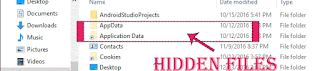
How to show hidden files in Windows 10 - Method 1
Creators Update, Windows 10 Anniversary Update, and other editions of Windows like Windows 10
earlier builds like Aug 2015 and Nov 2015 builds.
In our last post, we had seen how to show libraries in windows 10 , in this post lets see how to view
hidden files in Windows 10.
Do you need any software ??
No, you dont require any software to show hidden files in pen drive or to show hidden files on
windows 10 PC.
windows 10 PC.
Then, how to do it..?
Just follow the below steps..
Note : There are different steps we can use to show the hidden folder or item, like using Powershell, Registry, Command prompt and so on.
Listed, here are the basic steps that doesnt require any knowledge of using Command prompt
commands or powershell commands,
Note : There are different steps we can use to show the hidden folder or item, like using Powershell, Registry, Command prompt and so on.
Listed, here are the basic steps that doesnt require any knowledge of using Command prompt
commands or powershell commands,
1) First, Open your File explorer
If you dont know, how it is , then dont worry, just click on the below helpful link (what is file...)
[Helpful link : What is file explorer and how to open it]
2) When you have opened the file explorer you can find various tabs on the top of the pane
like File, Home, Share, View..
3) Click on the view tab.
4) It will display the Navigation pane and other related options like layout,current view, show or hide, etc..
5) Check the box "Hidden items"
Thats it, it will show the hidden folders located on the drive..
How to view hidden files in Windows 10 - Method 2
The problem with the above method is, it wont show files that were protected or faked to look like
Protected operating system files, which can be done by using command like attrib -s -h,etc.. Commands
So, we need to enable another option to view protected operating system files or the file that was
converted to look like protected file.
1) Just follow the steps 1 to 4 from the previous step..
2) When you are on the step 4, click on the options option
3)Select Change Folder and Search Options.
4) it Will open a New Window named folder options,on that find Click items as follows Which Will be on
View tab.
5) Under Advanced settings, scroll down and find the option "Files and folders" expand it,if it is not already expanded..
![How do i show hidden files in windows 10 [Updated]](https://blogger.googleusercontent.com/img/b/R29vZ2xl/AVvXsEhAqWfDgcybiPvJIlTBPFBvelmV_KjhfdyQWQW4Uhzq5tFJ4L2X_d6pK91qRWH1sW-OA2Wmsb29STSYGxsnFsQqX20yNLVwdyWMtN2RqgsIDNsS2TBKU4FGp-1ISzl1WZe_z1zEgaWXCI0/s320/hidden-files-2.gif "How do i show hidden files in windows 10 [Updated]")
6) When you expanded/ scrolled down you will find options like Hidden files and folders.
Below that, there will be 2 Options..
Dont show hidden files ,folders or drives.
and Show hidden files, folders or drives
7) Click on the Show hidden files, folders or drives option (radial button)
8) And again scroll down and Uncheck the box "Hide Protected Operating system files"
9) Click on Apply
10) Click on OK.
Close the window.
Thats it..
Warning : Try the Step 8 of method 2 only if you know the difference between operating system files and normal files, i dont recommend this if you are beginner or novice. As deleting or altering such files will result in your system crash. So, just skip 8 and follow the steps 9 and 10 after step 7.
Like, in the above you can show or view the hidden folders, files and drives in Windows 10 desktop , Windows 10 laptop and so on.
Remember you dont need to download software to open hidden files in windows 10 as it is inbuilt
in windows 10, and you need to change some options like above??.
Hope it is helpful
Thats the end of this post...
Click to read all basic tutorials..
5) Check the box "Hidden items"
Thats it, it will show the hidden folders located on the drive..
How to view hidden files in Windows 10 - Method 2
The problem with the above method is, it wont show files that were protected or faked to look like
Protected operating system files, which can be done by using command like attrib -s -h,etc.. Commands
So, we need to enable another option to view protected operating system files or the file that was
converted to look like protected file.
1) Just follow the steps 1 to 4 from the previous step..
2) When you are on the step 4, click on the options option
3)Select Change Folder and Search Options.
4) it Will open a New Window named folder options,on that find Click items as follows Which Will be on
View tab.
5) Under Advanced settings, scroll down and find the option "Files and folders" expand it,if it is not already expanded..
6) When you expanded/ scrolled down you will find options like Hidden files and folders.
Below that, there will be 2 Options..
Dont show hidden files ,folders or drives.
and Show hidden files, folders or drives
7) Click on the Show hidden files, folders or drives option (radial button)
8) And again scroll down and Uncheck the box "Hide Protected Operating system files"
9) Click on Apply
10) Click on OK.
Close the window.
Thats it..
Warning : Try the Step 8 of method 2 only if you know the difference between operating system files and normal files, i dont recommend this if you are beginner or novice. As deleting or altering such files will result in your system crash. So, just skip 8 and follow the steps 9 and 10 after step 7.
Like, in the above you can show or view the hidden folders, files and drives in Windows 10 desktop , Windows 10 laptop and so on.
Remember you dont need to download software to open hidden files in windows 10 as it is inbuilt
in windows 10, and you need to change some options like above??.
Hope it is helpful
Thats the end of this post...
Click to read all basic tutorials..
Available link for download
Friday, January 27, 2017
I 2013 Multidi g Access Communication Error after Update
I 2013 Multidi g Access Communication Error after Update
I-2013 mutidiag access failed to communication after update. And here are professional suggestion by diyobd2.fr. Hopefully, it helps someone.

Mise a jour de linterface de communication
(Updating the communication interface)

Erreur pendant le telechargement de la vci. Verifiez que la vci est connectree a l’outil et au vehicule.
(Error while downloading vci. Verify that the vci is connected to the tool and the vehicle.)
Suggestion from professional technicians work for diyobd2.fr:
1- try to re-install windows system (Windows XP or Win7 32bitbetter)
1- try to re-install windows system (Windows XP or Win7 32bitbetter)
2- disconnect network connection
3- re-install Multidiag access i-2013 according to the video guide below:
http://youtu.be/vc8aQxOMP_A
4- then it should work fine.
If the Multidiag i-2013 still fails to connection, please send your unit back to the vendor for repair.
To update Multi-diag software needs technique and luck:
You need to buy the corresponding chip to change it on the board, before software update.
V2011 update chip for Multi-Di@g J2534 Interface

This is the PIC12F629 chip for Multi-diag j2534 to update your tool from 2010 to 2011.
V2013.1 update chip for Multi-Di@g J2534 Interface

With this update chip, you can update your Multi-Diag j2534 interface from V2010 V2011 to V2013.1.
Tutorial: How to update Multi-Diag J2534 interface to v2013 v2011
Note: when use i-2013 multidi@g to test the car, it’s a must to setup the USB driver first.
Original - from diyobd2.fr obd2 francais:I-2013 Multidi@g Access Communication Error after Update
Available link for download
Actia multi diag I 2015 works ok on Passat VII 2010
Actia multi diag I 2015 works ok on Passat VII 2010
Today, i have done something on my VW PASSAT 2010: read and clear trouble codes successfully with Actia multi diag I-2015 interface.

connect to the car and laptop
start the Multi diag software
select a model to diagnose: VOLKSWAGEN->Passat VII (2010)


diagnose then all systems of the engine


warning for vehicle communication card


back to the main interface and click to turn on the key

open computer management and select USV PassThur Driver (multi-instance)

again back to select this model and setup PassThur+xs usb driver


select all systems-> engine electronics->fault memory


Muti diag I-2015 read and clear all faults


Done!
Actia multi diag download: https://goo.gl/gmjHr0
Original actia j2534:Actia multi diag I-2015 works ok on Passat VII 2010
Available link for download
Subscribe to:
Posts (Atom)