Showing posts with label x100. Show all posts
Showing posts with label x100. Show all posts
Saturday, March 4, 2017
How to Update OBDSTAR X100 Pro Auto Key Programmer Software
How to Update OBDSTAR X100 Pro Auto Key Programmer Software
Recently our engineer received some questions about how to update OBDSTAR X100 Pro software, here I will teach you how to do it.
Before update software, we should register first.
Open the device
Select [ABOUT] and press [ENTER] button
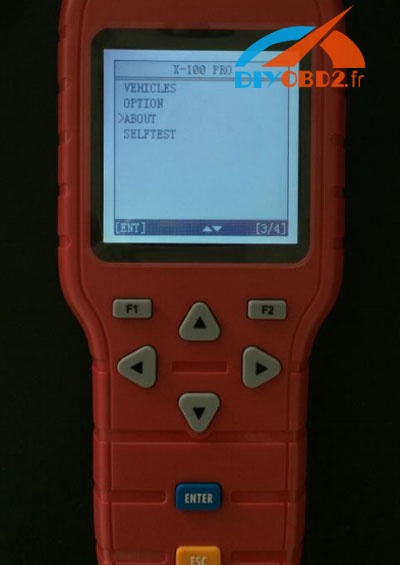
Then the information of the device will appear
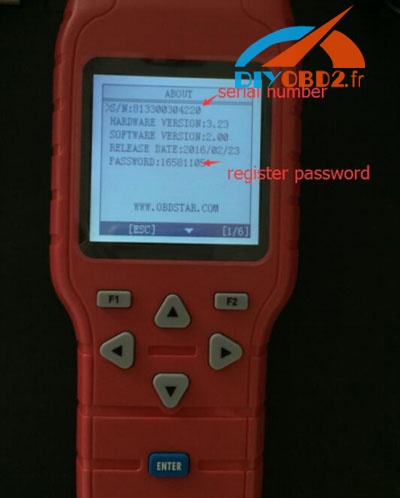
Note down the secret number and password
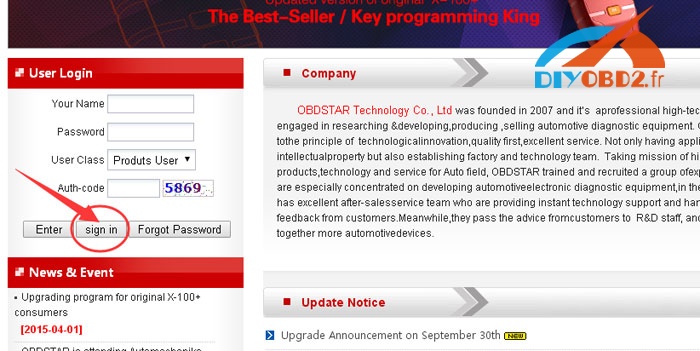
And go to the website www.obdstar.com and register.
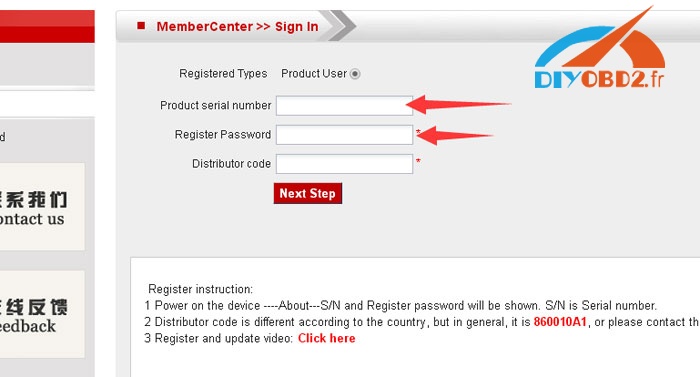
Input the serial number, password and distributor code
Click [Next Step]
After account registered, log in, build a new folder on your desktop, download all update software and put into the folder you just built.
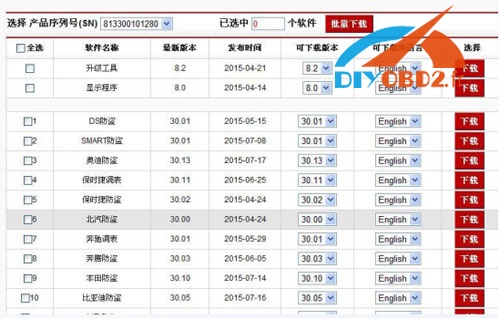
Update the update tool, connect TF card by card reader to your computer.
Choose the target folder and file folder like this:
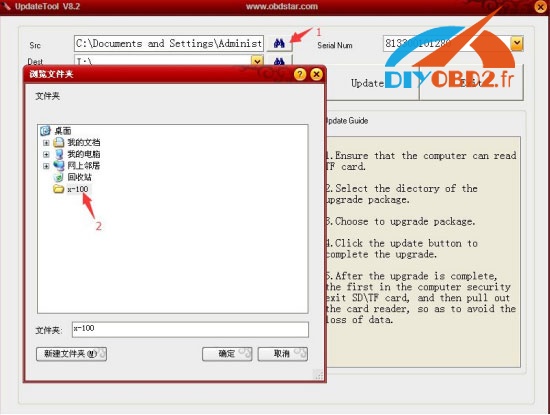
Select all files in the folder and click “update”
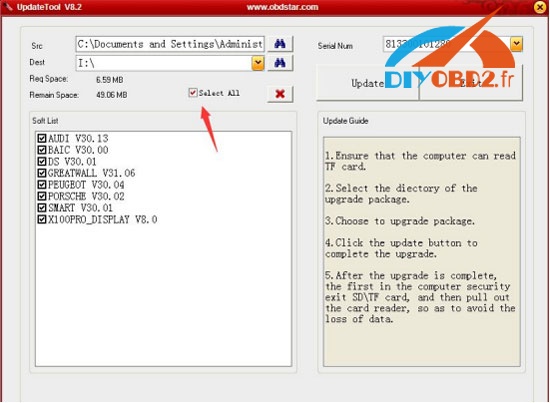
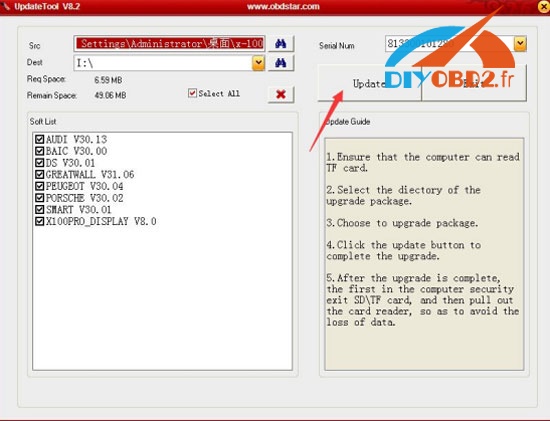
Wait until update finished, it would remind you update success!
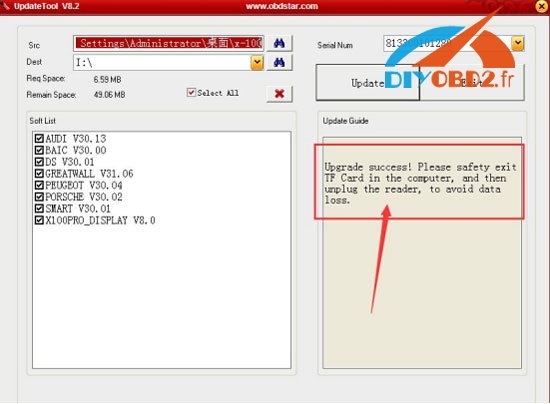
Done!
Available link for download

Friday, February 10, 2017
OBDSTAR X100 Pro feedback 2016 11 24
OBDSTAR X100 Pro feedback 2016 11 24
OBDSTAR X100 Pro feedback (2016.11.24):
Maruthi Suzuki key programming in 2 min , Hyundai I 20 key programming done , Hyundai verna fludic remote done in few seconds. Yes, it can do key lost and also u can add.
Honda cars,both making a spare and all key lost and remote programming,so far never failed.
-Mitsubishi Pajero 2014. All key lost OK.
-Mitsubishi Pajero 2014. All key lost OK.
Hyundai i 10 Key ok…
Hyundai i 10 remote ok .
Hyundai i 10 grand remote in 2 min ok
honda crv 2008 remote and key ok
jeep cherokee 2008 remote and key ok
mazda cx9 2009 smart key ok
jeep cherokee 2008 remote and key ok
mazda cx9 2009 smart key ok
Ford Eecosport 2015 Flip key programming ok…
Suzuki Ignis 2003 all lost key, programming new key OK.
Hyundai GETS 2007 KEY OK
HONDA ACCORD 2008 KEY AND REMOTE OK
HONDA ACCORD 2008 KEY AND REMOTE OK
Range rover sport hse 2012 start button , all key lost OK
2013 Elantra remote OK
2007 VW Rabbit add key and remote OK
2012 Town&County smart key OK
2002 Jetta add key FAIL (vehicle not supported msg, cant even read pin code)
2007 Quest add key OK
2008 Accord add key OK
2016 Subaru Forester add keys OK, remote program FAIL
2007 VW Rabbit add key and remote OK
2012 Town&County smart key OK
2002 Jetta add key FAIL (vehicle not supported msg, cant even read pin code)
2007 Quest add key OK
2008 Accord add key OK
2016 Subaru Forester add keys OK, remote program FAIL
Range rover sport 2007 add key ok
subaru outback 2008 add key ok
infinity fx 2009 smart key ok
subaru outback 2008 add key ok
infinity fx 2009 smart key ok
Audi a4 2006 rb8 dash diesel engine read pin from ecu Ok
Mazda 2 2009 all ok job done in seconds
Tucson 2014 .. key and remote programing ok
GMC ACADIA 2008 CAN’T ADD KEY…YOU SHOULD DO ALL KEY LOST …. 12 MINUTES … JOB COMPLETE
ford raptor 2012 key programing ok at least 2 keys must have
ford expedition 2011 all key lost ok
accent 2012 key programing pin read ok
i10 2012 read pin and swap ecu (ecm neutrelize) ok all ok
prado txl and gx 2013 smart key programing ok
prado 2012 ignition key programing ok
ford expedition 2011 all key lost ok
accent 2012 key programing pin read ok
i10 2012 read pin and swap ecu (ecm neutrelize) ok all ok
prado txl and gx 2013 smart key programing ok
prado 2012 ignition key programing ok
-Good tool for Honda. transponder + smart even all keys lost.
-Nissan leaf,Xtrail both are ok
-Toyota Hilux add g chip key easily. did one for all keys lost with eeprom adapter too.
-Toyota innova key added Ok
-2010 Ford Ranger,4D63.. all key lost OK.
-Mitsubishi pagero 2012 yes
Available link for download
Saturday, January 21, 2017
How OBDSTAR X100 Pro Program Ford Fiesta key
How OBDSTAR X100 Pro Program Ford Fiesta key
OBDSTAR X100 Pro auto key programmer Ford immobilizer software has updated to V30.24. It is able to program smart keys such as Ford Focus, Mondo, Transit, new Fiesta etc. very simple to use.
Car model: Ford Fiesta 2015
Here the key programming guidance with X100 Pro:
VEHICLE menu, Select [IMMOBILISER]

Choose vehicle model: [FORD] -> [FORD V30.24] and press ENT


It’s loading, initializing and authorizing, just wait…

[China Ford]

Choose [Smart key system]

[Fiesta] -> [Program keys] and press ENT button


It will read the password you should wait for a few minutes

Configuring the system,

The current number of keys is 2, Press ENT button

Switch ignition off and it will configuring the system again

The password

You should press the UNLOCK button of the smart key

Program success!
Available link for download
Subscribe to:
Posts (Atom)