Showing posts with label real. Show all posts
Showing posts with label real. Show all posts
Wednesday, March 15, 2017
New OBDSTAR X300 DP real pictures program key adjust mileage guide
New OBDSTAR X300 DP real pictures program key adjust mileage guide
Hi there! This blog tell you good news: OBDSTAR X300 DP is now available at diyobd2.fr! (Ready to send) And below are X300 DP real pictures and operating guides for key programming and mileage adjustment.
OBDSTAR X300 DP standard package: $929.25 free shipping
Immobilizer + odometer adjustment + EEPROM/PIC adapter + OBDII
OBDSTAR X300 DP full package: $719.25 free shipping
Immobilizer+ odometer adjustment+ EEPROM/PIC adapter+ OBDII+ ABS+ TPS+ SRS reset+ TPMS(low tire)reset+ Steering angle reset+ CVT learning/Value reset+ EPB+ Oil/service reset+ Battery matching+ Diagnosis for Japanese and Korean serials (extra bonus function)
OBDSTAR X300 DP tablet key programmer real pictures (took by diyobd.fr stuff):
OBDSTAR X300 DP main unit

OBDSTAR X300 DP IMMOBILIZER function

OBDSTAR X300 DP Diag Program function

OBDSTAR X300 DP other reset functions

OBDSTAR X300 DP entire package


OBDSTAR X300 DP box

How OBDSTAR X300 DP adjust mileage for 2016 Cadillac ATS-L?
http://blog.diyobd2.fr/2016/12/07/nouvelle-arrivee-obdstar-x300-dp-adjust-mileage-pour-2016-cadillac-ats-l/
How OBDSTAR X300 DP program keys for Hyundai Elantra 2011?
First insert the new key into cylinder and turn ignition to ON position.

Now you will find the immobilizer light keep on at dashboard.
Power up OBDSTAR X300 DP tablet key programmer, click “Diag Program” then “Immobilizer”. Choose “Hyundai” then “Hyundai V30.24”

Choose “Read ID46 chip password”

Wait a second and it will read out the chip password as 963701.
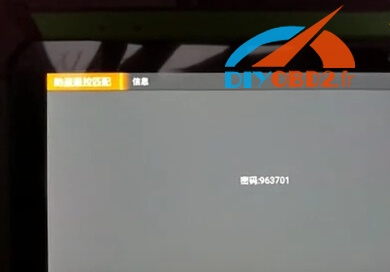
Then choose “Beijing Hyundai” (There is Korean Hyundai as well).
Choose program key by car model.
Select “Elantra 08-11” then “Immobilizer” click “Yes”.

Choose “key programming” click “Yes”. Enter password 963701.

Wait a while and it will show “Program success, whether to program next one?” Click “No” to complete program. Pull out the new key and wait 5 seconds.
Now OBDSTAR X300 DP program Hyundai Elantra 2011 successfully! The new key start car as expected!

Original - from diyobd2.fr obd2 francais:New OBDSTAR X300 DP real pictures+ program key+ adjust mileage guide
Available link for download

Tuesday, January 24, 2017
Real time protection in Windows defender How to turn on or turn off real time protection in Windows 10 Guide
Real time protection in Windows defender How to turn on or turn off real time protection in Windows 10 Guide
Real time protection in Windows defender : How to turn on or turn off real time protection in
Windows 10 - Thats what we gonna see in this post..
If you are looking for the antivirus or malware protector that comes with windows 10 then, likely it
is called Windows defender. When you install an application you will be prompted to enable real
time protection if windows defender real time protection is turned off, the agent that turned off may
be you are some malware.. Whoever it may be here is an guide to show how to turn on real time
protection back again or disable real time protection in Windows 10.
Do you need to turn off or turn on real time protection on windows 10 ?
No, you dont need to download an software to turn off or turn on Windows defender real time
protection on Windows 10.
then, where to find it?
just follow the steps below..
How to turn off real time protection of Windows defender in Windows 10 :
Note : Turning off real protection is not recommended as some harmful applications in the name of
Crack for software will affect your PC health, So think before you do..
If you are searching for a way to disable real time protection, then
simply
1) Open settings
[Helpful link : How to open settings using different methods in Windows 10]
2) Click on Update & security
3) It will open a a new window,Select Windows defender on the left pane
4) Now, you will see the Windows defender settings on the right pane, Find Real time protection
and click on the left side of the option.
So that it looks OFF.
Thats it, you had turned off real time protection of Windows 10..
If your Windows defender keeps turning on Automatically, then it is not your fault, it is
programmed to turn on automatically??.
How to turn on real time protection in Windows 10 ..

Just follow the above steps 1 to 4
While on step 4, simply tap/click on the right side of the option,so that it looks on.
Note : If real time protection is grayed out, then there it is more likely some other antivirus
programs running on your Windows 10, uninstall it and follow the same steps
Thats it..
Windows defender will run even though some other antivirus is running on your PC, click to see about it [Link]
Hope it is helpful
Enjoy.
Click to find latest articles
Windows 10 - Thats what we gonna see in this post..
If you are looking for the antivirus or malware protector that comes with windows 10 then, likely it
is called Windows defender. When you install an application you will be prompted to enable real
time protection if windows defender real time protection is turned off, the agent that turned off may
be you are some malware.. Whoever it may be here is an guide to show how to turn on real time
protection back again or disable real time protection in Windows 10.
Do you need to turn off or turn on real time protection on windows 10 ?
No, you dont need to download an software to turn off or turn on Windows defender real time
protection on Windows 10.
then, where to find it?
just follow the steps below..
How to turn off real time protection of Windows defender in Windows 10 :
Note : Turning off real protection is not recommended as some harmful applications in the name of
Crack for software will affect your PC health, So think before you do..
If you are searching for a way to disable real time protection, then
simply
1) Open settings
[Helpful link : How to open settings using different methods in Windows 10]
2) Click on Update & security
3) It will open a a new window,Select Windows defender on the left pane
and click on the left side of the option.
So that it looks OFF.
Thats it, you had turned off real time protection of Windows 10..
If your Windows defender keeps turning on Automatically, then it is not your fault, it is
programmed to turn on automatically??.
How to turn on real time protection in Windows 10 ..
Just follow the above steps 1 to 4
While on step 4, simply tap/click on the right side of the option,so that it looks on.
Note : If real time protection is grayed out, then there it is more likely some other antivirus
programs running on your Windows 10, uninstall it and follow the same steps
Thats it..
Windows defender will run even though some other antivirus is running on your PC, click to see about it [Link]
Hope it is helpful
Enjoy.
Click to find latest articles
Available link for download
Subscribe to:
Posts (Atom)