Showing posts with label icom. Show all posts

Sunday, March 5, 2017

BMW ICOM or K Dcan cable to reset steering angle sensor

BMW ICOM or K Dcan cable to reset steering angle sensor


Here are two solutions of resetting BMW steering angle sensor, one using BMW ICOM ENET Toolset 32 for bmw F series, the other using INPA K+Dcan cable for bmw E series.
Why you need reset SAS?
The steering angle sensor (SAS) is a vital part of the ESC system that measures the steering wheel position angle and rate of turn.
When wheel alignment gets done or the actual physical direction the steering is set at, and the steering angle sensor’s last calibration is different enough to cause the DSC (dynamic stability control) ECU confusion in certain conditions.
Then you need to reset the steering angle sensor so that its straight ahead reading in software corresponds with the physical straight ahead position. 
---> For BMW F series cars:
Solution 1: bmw icom with Tool 32 reset steering angle sensor
Bmw 320d f30 2005
Bmw icom a2
Toolset 32
Well connected ENET cable or ICOM emulator with vehicle
Start launching Toolset 32 /Tool32:

Select “Load SGBD Group file”
Find your DSC module and click “open”, for example, a E90 2005 320D it is DSC_87.prg)
Drop down the “Jobs” list and find out “lenkwinkel dsc abgleichen” option, ignition on and double click the option. Wait for about 10 seconds until the job is finished.
The steering Angle is calibrated and VIN is matched to car.

---> For BMW E series:
Solution 2: K+DCAN usb cable with INPA reset steering angle sensor
Bmw e46
K+dcan cable
Inpa software
Well connect k+dcan cable
open INPA on the laptop
Select vehicle as E46
Select chassis
Select steering angle sensor

Hit F5 to read status

Hit F4 and the system will show the general status

You will able to view the current steering angle sensor is calibrated to close to zero deg. when the physical steering is pointed straight ahead

If the steering angle sensor calibration value is not extremely close or exact, you need to reset it.
Go to main menu and select E46 again
Select chassis
Select
DCS MK6

Click SHIFT+F4 buttons at the same, the system will display the compensation routines.

bmw icom a2+b+c diagnostic & programming tool

bmw icom a2+b+c diagnostic & programming tool 
Avec un ordinateur portable

2016?12?22????

Réinitialiser le capteur dangle de direction BMW, Tool32 ou INPA?

Voici deux solutions de réinitialisation BMW capteur dangle de braquage, un à l aide de BMW ICOMENET Toolset 32 pour BMW Série F, lautre en utilisant le câble INPA K + DCAN pour BMW Série E.

Pourquoi vous avez besoin de réinitialiser SAS?
Le capteur dangle de braquage (SAS) est une partie essentielle du système ESC qui mesure langle de position du volant et la vitesse du tour.
Lorsque lalignement des roues se fait ou la direction physique réelle de la direction est fixé à, et dernier étalonnage capteur de langle de braquage de est assez différent pour provoquer le DSC (contrôle dynamique de la stabilité) ECU confusion dans certaines conditions.
Ensuite, vous devez réinitialiser le capteur dangle de braquage de sorte que son droit devant la lecture dans le logiciel correspond à la position droite physique.

-> Pour les voitures de série BMW F:
Solution 1: bmw icom avec outil de capteur dangle de braquage de 32 réinitialisation
Bmw 320d f30 2005
Bmw icom a2
Toolset 32
Bien relié  par ENET cable ou émulateur ICOM avec le véhicule
Lancer le lancement Toolset 32 ??/ Tool32:

Sélectionnez "Charger fichier SGBD Group"

Trouvez votre module DSC et cliquez sur "ouvrir", par exemple, un E90 2005 320D est DSC_87.prg)
Dérouler la liste "Jobs" et trouver loption "lenkwinkel dsc abgleichen", contact et double-cliquez sur loption. Attendez environ 10 secondes jusquà ce que le travail est terminé.
Langle de braquage est calibré et VIN est adapté à la voiture.


-> Pour BMW Série E:
Solution 2: câble usb K + DCAN avec capteur dangle de braquage de remise à zéro INPA
bmw e46
K+dcan cable
Inpa software
Bien connecter k + câble DCAN
ouvert INPA sur lordinateur portable

Choisir véhicule E46
Choisir châssis
capteur dangle Select de direction

Hit F5 pour lire l état

Hit F4 et le système affiche létat général

Vous sera en mesure dafficher le capteur dangle de braquage actuel est calibré à près de deg zéro.lorsque la direction physique est pointée droit devant

Si la valeur détalonnage du capteur dangle de braquage est pas très proche ou exacte, vous devez le réinitialiser.
Aller au menu principal et sélectionnez E46 nouveau
Sélectionnez châssis
Sélectionnez
DCS MK6

Cliquez SHIFT + touches F4 au même, le système affiche les routines de compensation.
Click F1 button to reset the steering angle sensor

Go back to steering angle sensor menu to view the current status. The calibrated value should go down to zero. The procedure is complete and then you can clear the error codes or do other coding options.
Enjoy!

Available link for download

Read more »

Wednesday, March 1, 2017

Free download BMW ICOM Rheingold ISTA 4 03 13 Torrent

Free download BMW ICOM Rheingold ISTA 4 03 13 Torrent


In this blog diyobd2.fr offer you free download link of newest BMW Rheingold ISTA+ 4.03.13 Standalone / SDP 4.02.31 / ISTA-P 3.60.2.001! Also ISTA 4.02.14 link is here. Mates enjoy but also try on your own risk!
Free download BMW ISTA+ 4.03.13 Standalone / SDP 4.02.31 / ISTA-P 3.60.2.001:
https://mega.nz/#!UkokgQhC!Vpviwwre4R32W0oVDsIl5Wt0-bTuo7Y8qOHXz3FCGXU
BMW ISTA 4.03.13 software package list:

Free download BMW ISTA-D Rheingold 4.02.14 Standalone / SDP 4.02.13 / ISTA-P 3.60.0.600
https://mega.nz/#!1lYRyYCa!s734Z8ilpoeLkyPaxQCUMb2NHZ2yTXqhp-Kgd4-B9JE

BMW ISTA-D Rheingold 4.03.13+ ISTA-P 3.60.2.001 required interfaces:
BMW ICOM A2
BMW ICOM A3
BMW ICOM Next
BMW INPA K+DCAN USB interface
BMW ENET cable

Software details of BMW ISTA Rheingold 4.03.13:
Module (ECU) errors reading and clearing
Gearbox (transmission) and engine adaptations erasing
Fuel injectors control, correction amount real time viewing, injector registering
Engine mountings testing
Mass air flow (MAF) testing and registering. Whole air system testing
EGR system control and testing
Turbocharger and related components control and testing
Diesel particulate filter regeneration (DPF)
Battery replacement
Oil change and service interval reset
Wiring diagrams, live data, repair instructions, technical documents etc
Programming, vehicle retrofit, mirror coding, FSC codes adding or updating etc
And many more other functions

Before install BMW ISTA+ Rheingold 4.03.31, need Install:
Ediabas 7.3.0, Java, vcredist 2005-2015, vs90_piaredist, net framework 4.5.2 and 4.6.2
If the system is x64, vcredist must install and x86 and x64, otherwise start Rheingold.
All except Java and net framework 3.5 is in the Tools folder.

Operating system:
Windows 7 (32-bit or 64-bit)
Windows 8 or 8.1 (32-bit or 64-bit)
Windows 10 (32-bit or 64-bit)

Original - from diyobd2.fr obd2 francais:

Free download BMW ICOM Rheingold ISTA 4.03.13 (Torrent)

Available link for download

Read more »

Friday, February 10, 2017

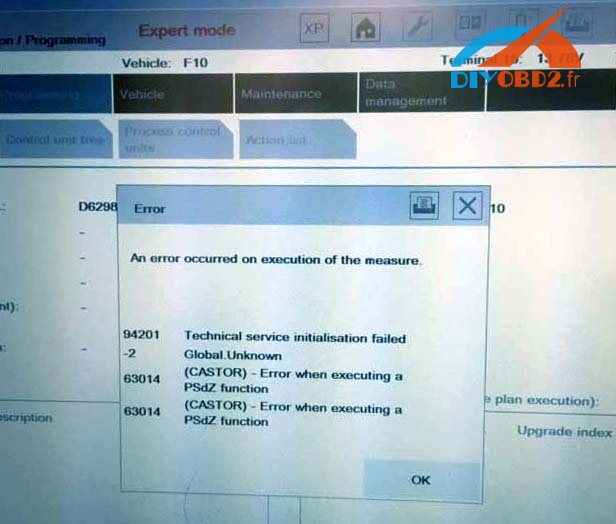
Icom a2 ISTA P V3 58 with BMW F10 programming solution

Icom a2 ISTA P V3 58 with BMW F10 programming solution


Have used2016 Ista P version 3.58 to do some programming on F10 but always got the error message:

”an error occurred on execution of the measure.
94201 technical service initialisation failed
-2 global unknown
63014 (castor) - error when executing a psdz function
63014 (castor) - error when executing a psdz function”
Ediabas 7.3.0 is installed correctly and patched. There is no problem with other cars like E series.

Windows Firewall is disabled and there is no other security software on that laptop.
ISTA/P works OK with other cars, so presume configuration is OK.

Reset a batteryon the vehicle. It is said that if F series sometimes gives this error, disconnecting the battery for 15 minutes usually solves the problem...but not worked for me also.

I installed the BMW software myself and I am not any expert on the matter, so it is possible I have copied some files into wrong directories.  I have two main folder on C: drive Rheingold with ISTA Diagnosis which works well. My SQliteDBs and PSdZ folders are in there. ISTA P is installed in a separate folder on C: drive . There is no PSdz subfolder in ISTA P.Then i copied data to the following directory:%:ISTA-PBMWServicesdataecudata...not worked too
Finally, i guessed it was related to the faulty ICOM A1. So i connected the different BMW Icom A2 emulator from a Chinese vendor: diyobd2.fr, the problem has gone ....

Available link for download

Read more »

Monday, February 6, 2017

How to rework ICOM A2 with heatsink for Cooling chips

How to rework ICOM A2 with heatsink for Cooling chips


This is a great solution of ICOM A2 reworkwith a heatsink which is cooling both chips.
(GREAT THANKS to B1257)
Now here are some pictures about the heatsink I made.

Picture1 As you can see in my way the heatsink is made with two parts. The main center plate which will later touch the complete case for a better heat dissipation. And second the small CPU plate which is glued with a special Thermal Bound paste for FPGA chips on the center plate. You can see the compound type on the picture.

Picture2 Shows the Temp in C° after an idle running time of the head about 30 minutes, without any cooling.

Picture3 Original there are two pads for the cooling, but not one is touching the case, after a longer time the complete case will warm up in a way that the both chips are near out of max temp range, which is in a normal grade about 70°C. For our heatsink I will use a small pad for the MICREL chip to give me the right contact to my center plate. Second reason is that the pad gives me a little bit place for a realignment to center the main plate with both chips.

Picture4 You can see new srewls and bolts to compensate the new height. The screwls dimension of the innerside srewls is 2.5x12mm (countersunk bolt, this is important, because we cant fix the center place in the case if there is not enough place with normal screwls.)

Picture5 Be careful to center the plate exactly with vary the three plastic bolts, may you have to cut it a little bit. Check the space between the case and the center plate one or more times. Take care that both chips are touching the heatsink, because some cases can vary the height.

Picture6 Apply compound paste to the center plate, where the heatsink is later touching the case for the best heat dissipation.

Picture7 For the best way take care that the complete heatsink is touching the case. See the red arrow.
After the heatsink mod the temps are always inside the specs. I remember 5 hours idle running about 40.5C° room temp about 26°C.
Attachment:
Heatsink Dimension PDF overview
https://mega.nz/#!C88F2LjL!rVms_i_EzXJHLw8H9KlWUrNAz6Q_iqb0-XqMlZEYCyM
Sketup File
https://mega.nz/#!TsMDBJ6J!swzuKD5_4TnTrVhzjiEqrwTWcV5yDp5mu0wYwnpZm84
I hope this helps you to mount the heatsink in a proper way.
So advice to all -
To avoid issues, please check the PCB design (with the cooling plate) before your buying. when buying from China, it seems diyobd2.fr is one of the safest way to make sure of things quality.

This is their ICOM A2 pcb with a cooling plate
(BIG THANKS to B1257 in http://cartechnology.co.uk/)

Original - from diyobd2.fr obd2 francais service technique:How to rework ICOM A2 with heatsink for Cooling chips

Rapporter larticle:

bmw icom francais

Available link for download

Read more »

Saturday, February 4, 2017

solved ICOM NEXT ISTA P error occurred during execution

solved ICOM NEXT ISTA P error occurred during execution


Used ISTA / P 3.60.1 (Loader 6.1F) with ICOM NEXT for bmw motorcycle programming but met the error message:
Fehler
Bei der Durchfuhrung der MaBnahme ist ein Fehler aufgetreten
94201    Fachdiendtinitialisierung fhelgeschlagen
-2        Global Unknown
1000000  Global Unknown
(Error in ISTA P
An error occurred during the execution of the action
94201 Technical deadline initialization fhelgeschlagen
-2        Global Unknown
1000000  Global Unknown)
Here is the customer solution:
Try to disconnect the battery for 15 min.
then reconnect the battery
turn ignition on (KL:15)
wait 1min and then connect the ICOM and restart
On a note from another:
There is not enough info to determine which model the programming is being attempted on but the belief that disconnecting battery on the the bikes does some form of reset on engine ECU is an urban myth, power is removed from the processor systems and memory every time the ignition is turned off
I will try and report here. Hope it does help.
Original:(solved) ICOM NEXT ISTA-P error occurred during execution

Available link for download

Read more »

Sunday, January 29, 2017

K DCAN cable pinout ICOM D pinout for BMW bike diagnostics

K DCAN cable pinout ICOM D pinout for BMW bike diagnostics


Usually, K+DCAN usb cable and ICOM D adapter are the most cost-effective diagnostic bundle for BMW bikes/motorcycles. But some chinese knock-offs probably come with wrong pinout. Here share my pinout setup with you all.
I have ENET cable but could not use it with the bike. I have used USB-K+DCAN cable instead.There are only 2 pins incorrectly wired but this is something thoroughly discussed on specialized diagnostic fora so it takes only 10 minutes (and soldering iron) to correct the wiring.
So final wiring of 10 pins plugshould be like this:
OBD2 BMW 10 pin
4&5————-4 (Bat-)
7—————1 & 2 (K Line) – ECU / ABS
16————–6 (Bat+)
1—————10
or
OBD2 BMW 10 pin
4&5————-4 (Bat-)
7—————1
8—————2
16————–6 (Bat+)
1—————10
If the adapter you buy, has one of this set-ups you should be good.
2) I have bought my ICOM D from China (one week around to wait of course but it is really worth it).
some of the chinese ICOM-D cables are incorrectly wired and the 10 pin round connectors are of very poor quality, the correct pin out is
It will depend on whether the OBD end of the cable is screwed together as to whether you can change it
Then there is the question of what OBD interface you are using to the PC
In short, what I personally did (I am sure I know less then 1% what this powerful software can do):
-change the SA and VO code (adding/deleting options in case of the car and FA in case of the bike) – this was done with NCS Expert.
-coding the car with INPA and NCS Expert to “tell” it that I no longer have the rear right and rear door airbags
-coding with INPA and NCS Expert the passenger presence mat state which is broken, but rather then changing it, I just coded it.
-changed miles to km all the readings (speedometer, odometer, consumption) with NCS Expert on the car and ISTA-P on the bike
-unlocked the TV in motion on the car with NCS Expert and NCS Dummy
-updated the car and bike software with new Daten files using NCS Expert on the car and ISTA-P on the bike
-retrofitted LEDs on the bike using ISTA-P
-retrofitted factory alarm on the bike using ISTA-P
-set new service interval for the bike (both date and mileage)
-read and cleared the faults on the car and bike using Rheingold (ISTA-D)
-looked deeper into my exhaust flap operation by triggering it closed and open from Rheingold diagnostic software (in fact Rheingold is a very powerful diagnostic tool which I am told is used by the dealer already)
I am sure it can do much more, but this was what I bought it for and it did all brilliantly and it was as easy as moving the cursor around the screen and pressing a button (well, moving the stylus in my case as I have a Thinkpad X200 tablet)
Original - from diyobd2.fr obd2 francais:

K+DCAN cable pinout & ICOM D pinout for BMW bike diagnostics

Available link for download

Read more »