Showing posts with label solution. Show all posts
Showing posts with label solution. Show all posts
Saturday, February 25, 2017
Windows 10 C Drive Full without any reason Solved solution
Windows 10 C Drive Full without any reason Solved solution
My c drive suddenly Full without reason in Windows 10 - This time its not for my friends, to me??
Creators Update, Windows 10 Anniversary Update, and other editions of Windows like Windows 10
earlier builds like Aug 2015 and Nov 2015 builds..
![Windows 10 C Drive Full without any reason [Solved]](https://blogger.googleusercontent.com/img/b/R29vZ2xl/AVvXsEhgy4LcOlnzCqg7ti9DuIXcXrAAaMshbvEbvUIATCcLhgL9OX4DeDATplXbZBTzjLY_6i-gSsd0pF0M-m18hoZ4l8V4cfWdFflyCFqt1Iwx3mU0h1U_f2r9X29yknpkA9wkTwsHwz4skZw/s400/c-drive-full.gif "Windows 10 C Drive Full without any reason [Solved]")
1) Right click on This PC and Select Properties.
[See : How to make Windows to show desktop icons in Windows 10 ]
2 )Click on System Protection on the left pane.
??( I smiled because i fixed the problem :0 ) If you are experiencing the same problem and have
questions like "c drive keeps filling up in my windows 10 PC" or "My c drive suddenly in full
windows 10" or any other related query, then here is a simple guide that may help you to fix the
problem. -Works on Windows 10
Creators Update, Windows 10 Anniversary Update, and other editions of Windows like Windows 10
earlier builds like Aug 2015 and Nov 2015 builds..
How to clean it?
There, are many things that may fill up your PC like installing many softwares, your PC has more
files and something related to it..
But, sometimes you may find your C drive full without any reason, like it happened to me, I just
wrote a blog post about how to Check amount of free space in hard disk or SSd you can see it
[here] but when i returned after my breakfast i was shocked to see My hard disk Space becoming
almost full and a low space notification starts to appear.
I dont know, what happened to my PC, so i started to figure out the things.. Which i worked..
First, i checked Whether System restore point was full.
How to clean System Restore Points in Windows 10
1) Right click on This PC and Select Properties.
[See : How to make Windows to show desktop icons in Windows 10 ]
2 )Click on System Protection on the left pane.
3) It will Open System Properties
4) Select the C drive on the Protection settings
5) Click Configure
6) It will open System Protection for Local Disk C:
7) Click on Delete
8) Click on Apply - > OK.
Unfortunately, it doesnt showed much result to me, So i moved to the next step which is
clearing Recycle Bin
How to delete Recycle bin files in Windows 10
1) Open recycle bin
[ Helpful link : Where can i find recycle bin in Windows 10]
2) Press Ctrl + A, and then Shift + Delete keys on Keyboard
Thats it..
It doesnt worked for me, because i usually delete files using the shift + Del method which
will permanently delete all your files.
So, i moved to clear temp section..
How to clear temp in Windows 10..
Refer the below video..
[Video tutorial]
It cleared some free space, but still im not satisfied..
Next, i thought to use disk clean up utility but, i thought it wont yield better result, because i only
performed the disk cleanup the previous day.
At last, i done something unusual (i dont know how it appeared on my mind) its looking on Event
viewer.
I finally solved the problem. What happened to my PC was,it faced with Blue screen of Death error
again and again.
So, it was the log files that increased my PC storage, Clear it and you will get back your free hard
drive space of C drive.
Since, it worked for me on the previous step, i had stopped. However, if your issue was still resolved,
try deleting or uninstalling a program that occupies your hard disk Space.
Thats it..
Click to read all latest articles.
Available link for download

Friday, February 10, 2017
Icom a2 ISTA P V3 58 with BMW F10 programming solution
Icom a2 ISTA P V3 58 with BMW F10 programming solution
Have used2016 Ista P version 3.58 to do some programming on F10 but always got the error message:
”an error occurred on execution of the measure.
94201 technical service initialisation failed
-2 global unknown
63014 (castor) - error when executing a psdz function
63014 (castor) - error when executing a psdz function”
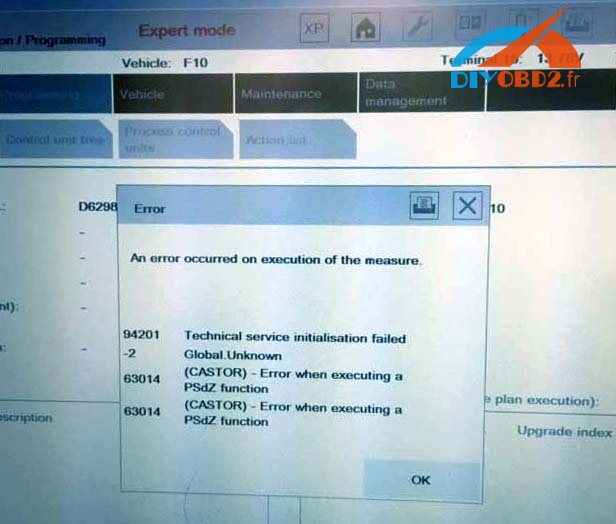
Ediabas 7.3.0 is installed correctly and patched. There is no problem with other cars like E series.
Windows Firewall is disabled and there is no other security software on that laptop.
ISTA/P works OK with other cars, so presume configuration is OK.
Reset a batteryon the vehicle. It is said that if F series sometimes gives this error, disconnecting the battery for 15 minutes usually solves the problem...but not worked for me also.
I installed the BMW software myself and I am not any expert on the matter, so it is possible I have copied some files into wrong directories. I have two main folder on C: drive Rheingold with ISTA Diagnosis which works well. My SQliteDBs and PSdZ folders are in there. ISTA P is installed in a separate folder on C: drive . There is no PSdz subfolder in ISTA P.Then i copied data to the following directory:%:ISTA-PBMWServicesdataecudata...not worked too
Finally, i guessed it was related to the faulty ICOM A1. So i connected the different BMW Icom A2 emulator from a Chinese vendor: diyobd2.fr, the problem has gone ....
Available link for download
Monday, January 23, 2017
Renault CAN CLiP no vcc 3 3v to AN2135SC customer solution
Renault CAN CLiP no vcc 3 3v to AN2135SC customer solution
In the Renault CAN CLIP inner board, I found no vcc 3.3v to AN2135SC fromvoltage regulator. Actually there is no +5v IN from usb port to voltage regulator . Need +5v on both pins (1 and 3)
On red arrow no +5V on image,normally no 3v3 to blue arrow,but on green there is +5v
Also from back side near usb connis also same vol.reg and its have all voltages ok
Also from back side near usb connis also same vol.reg and its have all voltages ok

Here are some Renault clip users’ solution. I adopted it... Worked!
it is possible solder a wire from +5v to IN pin, but also need to OFFON pin to enable output voltage 3.3v. But in that case both red diodes are ON even no connected obd conn to car. Also tried to "take" 3.3v from other clip pcb and then find sonde when start clip sq, only ask for firmware update so will try lower version sw. Now use v96
Then I sill bring +5v to both IN and ON/OFF and will get 3v3 only both red leds will be on
Another user also had a problem with the 3.3V regulator , and he used a normal 3.3v regulator without ON/OFF and it worked correctly , except that the 2 red leds always on.
Original:Renault CAN CLiP no vcc 3.3v to AN2135SC (customer solution)
Available link for download
Tuesday, January 17, 2017
OBDSTAR VAG PRO Audi License Error Suggestion Solution
OBDSTAR VAG PRO Audi License Error Suggestion Solution
Here are some tips for OBDSTAR VAG PRO”license error” when change mileages, reset service and steer on Audi.
2007 gti, 2008 seat leon, 2008 audi a4? 2012 audi q5 fails to do steering reset, mileage correction, service reset. And the device displays “license error” then the dashboard is freezed.


Solutions and suggestion from obdstar customer service:
Try to update VAG PRO Audi to the latest version via the official website: www.obdstar.com.
OBDSTAR scanner update tips
Then the issue should be solved.
Here are all testable Audi models for vag pro.
Vag pro for IMMO on Audi v31.13:
Read security code
17 Dashboard
Auto
A4 RB8 2006-2007
Manual
25 Immobiliser
Auto
Manual
01 Engine
Auto
Manual
Program keys
17 Dashboard
25 Immobiliser
Program remote
35 Central lock(KWP1281)
46 Central comfort module(KWP1281)
17 Dashboard
Auto
A4 RB8 2006-2007
Manual
25 Immobiliser
Auto
Manual
01 Engine
Auto
Manual
Program keys
17 Dashboard
25 Immobiliser
Program remote
35 Central lock(KWP1281)
46 Central comfort module(KWP1281)
Vag pro for Audi Odometer Mileage v30.72: Audi
A3
2003-2006
2007-
A4
RB4 2002-2005
RB8 2006-2007
A4L
2008-2012
2013-
A5
2008-2012
2013-
A6
1998-2004
A6L
2004-2008
2009-
A8L
2003-2006
Q5
2008-2012
2013-
Q7
2006-2008
2009-
R8
R8 2007-
S5
2008-2012
2013-
S8
2007-
TT
TT 2007-
A3
2003-2006
2007-
A4
RB4 2002-2005
RB8 2006-2007
A4L
2008-2012
2013-
A5
2008-2012
2013-
A6
1998-2004
A6L
2004-2008
2009-
A8L
2003-2006
Q5
2008-2012
2013-
Q7
2006-2008
2009-
R8
R8 2007-
S5
2008-2012
2013-
S8
2007-
TT
TT 2007-
Obdstar vag pro for audi RESETSRS: Audi
4B0959655G
Erase collision record
Erase the ECU internal fault
4B0959655R
Erase collision record
Erase the ECU internal fault
4B0959655G
Erase collision record
Erase the ECU internal fault
4B0959655R
Erase collision record
Erase the ECU internal fault
Vag pro obdstar for audi STEERRESET V30.01: Audi
Break electronic system
Steering wheel electronic system
Steering electronic system
Break electronic system
Steering wheel electronic system
Steering electronic system
Available link for download
Subscribe to:
Posts (Atom)